
Quick answer: Click-to-WhatsApp ads are Facebook and Instagram ads that open a WhatsApp chat with your business when someone taps them. A WhatsApp catalog is a product list that lives inside your WhatsApp Business profile, with photos, prices and descriptions. Used together, the ad brings a buyer into the chat, and the catalog lets them browse and order without leaving WhatsApp. In 2026, every chat that starts from one of these ads gets a 72-hour window in which all your messages to that person are free.
Most people do not want to fill in a long form. They want to ask a quick question and get a quick reply. That is why selling inside WhatsApp works so well. The buyer is already in an app they open many times a day. You meet them there, answer them in seconds and show them what to buy.
This guide shows you how to do that step by step. You will learn how to build a WhatsApp catalog, how to set up Click-to-WhatsApp ads in Meta Ads Manager, what it really costs in 2026, and how to turn each chat into a sale. If you want an expert team to run it for you, our WhatsApp marketing services cover the full setup.
What Is a WhatsApp Catalog?
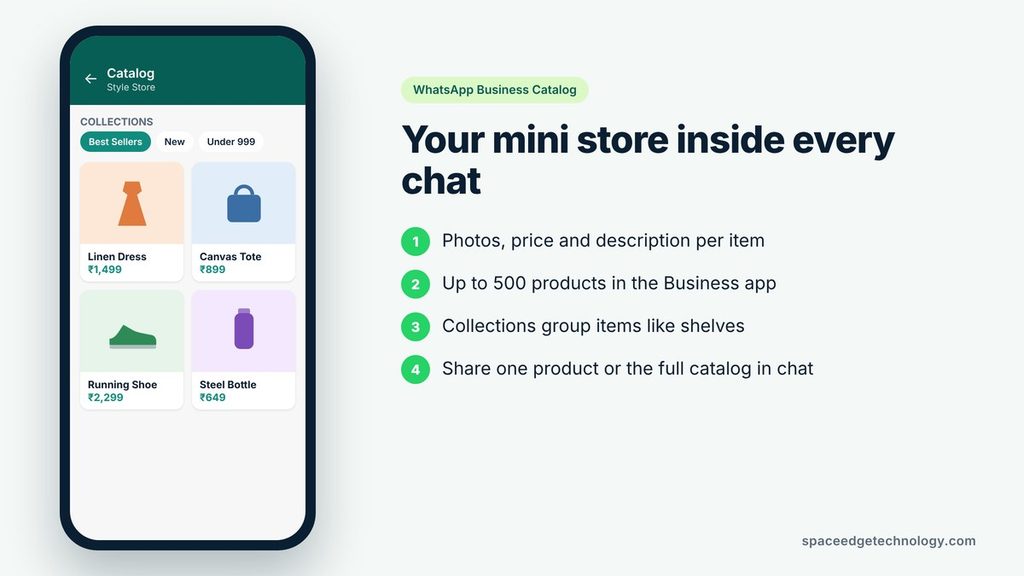
A WhatsApp catalog is a mini online store inside your WhatsApp Business profile. Each item shows a photo, a name, a price, a short description and, if you want, a link to your website.
Customers can open your catalog from your profile or from a chat. They can scroll through items, tap one to see details and send you a message about it. You can also send a single product or the whole catalog to a customer during a chat.
What You Can Add to Each Product
Every catalog item can hold:
- A product name
- A price (or you can leave it blank for services)
- A description
- Up to 10 images per item
- A product code or SKU
- A link to the product page on your website
Meta checks each product against its Commerce Policy before it goes live. Most items get approved within minutes, but some can take up to 24 hours.
How Big Can a WhatsApp Catalog Be?
The WhatsApp Business app lets you list up to 500 products. If you use the WhatsApp Business Platform (the API), you manage your catalog in Meta Commerce Manager instead. That route supports bulk uploads through a data feed or a store sync, such as Shopify. Limits on the API side have changed over time, so always check the current number inside your own Commerce Manager account.
You can link only one catalog to one WhatsApp Business Account. If you sell more than your limit, pick the products that sell best, have good margins or get asked about most.
What Are Collections?
Collections are groups of products inside your catalog. Think of them as shelves in a shop. You might create collections like “Best Sellers”, “New Arrivals”, “Under 999” or “Festive Gifts”.
Collections make a big catalog easy to scan. A buyer who wants a gift does not have to scroll past 200 items. They tap the “Gifts” collection and see only what they need.
What Are Click-to-WhatsApp Ads?
Click-to-WhatsApp ads (often called CTWA ads) are ads on Facebook and Instagram with a button such as “Send WhatsApp Message”. When someone taps the button, WhatsApp opens on their phone with a chat to your business already started.
The flow is short:
- A person sees your ad on Facebook or Instagram.
- They tap the WhatsApp button.
- WhatsApp opens with a ready-made message, such as “Hi, I want to know the price.”
- They tap send, and the conversation begins.
- You reply, share products from your catalog and close the sale.
Compare that with a normal website ad. The buyer lands on a page, waits for it to load, looks for the right product, fills in a form and then waits for a call. Every step loses people. A Click-to-WhatsApp ad removes most of those steps.
Why Chat Beats a Landing Page for Many Businesses
A chat feels personal. The buyer can ask, “Do you have this in blue?” or “Can you deliver by Friday?” and get an answer at once. That quick back-and-forth builds trust, and trust is what turns a browser into a buyer.
You also keep the contact. Once someone messages you, their number sits in your WhatsApp inbox. You can follow up later, within WhatsApp’s rules, instead of losing them the moment they close a web page.
Where Click-to-WhatsApp Ads Appear
These ads can run across Meta placements, including the Facebook feed, Instagram feed, Instagram Stories and Reels. You can let Meta choose placements for you or pick them by hand.
Note that some messaging features and metrics are limited for ads shown to people in Europe, Japan and South Korea. If you sell in those regions, check what Meta allows before you plan a campaign.
How the Catalog and the Ads Work Together
The ad and the catalog do two different jobs. The ad gets attention and starts the chat. The catalog answers the question “What can I buy?” right inside that chat.
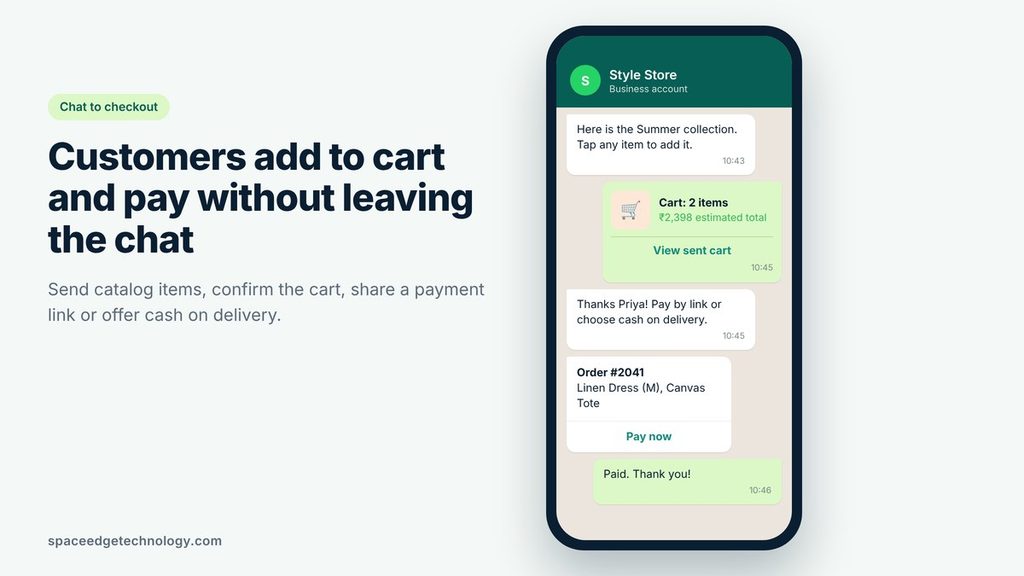
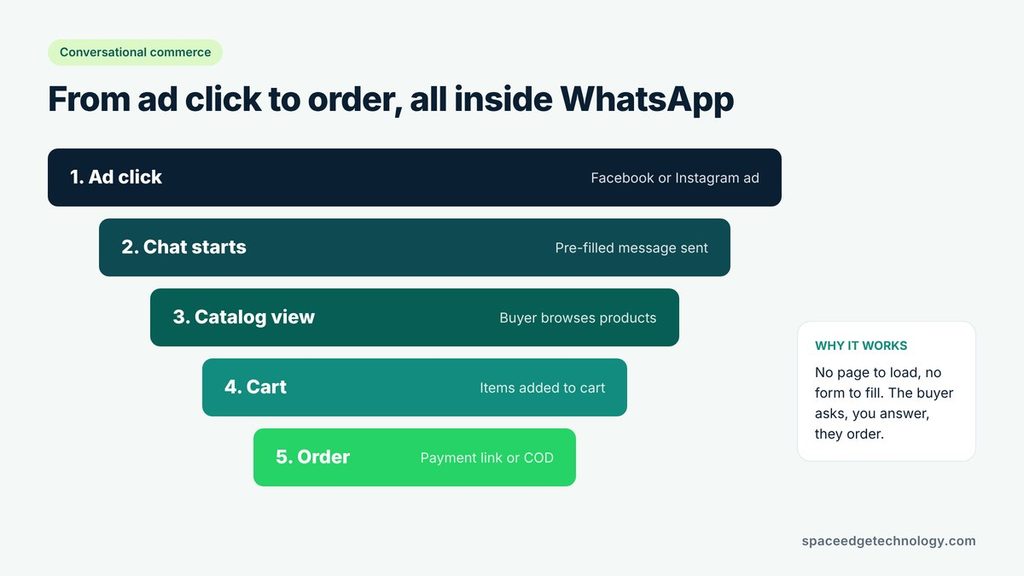
Here is what a good flow looks like:
- Ad: A clothing brand runs a Reel showing three summer dresses with the button “Send WhatsApp Message”.
- Pre-filled message: The buyer’s chat opens with “Hi, show me the summer collection.”
- Auto-reply: The business sends a greeting and the “Summer” collection from its catalog.
- Browse: The buyer taps a dress, picks a size and adds it to the cart (cart features depend on your setup).
- Order: The buyer sends the cart. The business confirms the order, shares a payment link or offers cash on delivery.
- Follow-up: The business sends an order update and, later, a “new arrivals” message.
The whole journey happens in one app. There is no page to load and no password to create. That is why this combo is one of the strongest sales tools for small and growing brands in 2026.
WhatsApp Business App vs WhatsApp Business API
You can run a catalog and Click-to-WhatsApp ads with either the free WhatsApp Business app or the paid WhatsApp Business Platform (the API). The right choice depends on your size and how many chats you get.
| Feature | WhatsApp Business app | WhatsApp Business API |
|---|---|---|
| Cost to start | Free | Per-message fees plus provider charges |
| Who it suits | Solo sellers, small shops | Growing brands, e-commerce, teams |
| Catalog management | In the app, one item at a time | Meta Commerce Manager, bulk upload or store sync |
| Product limit | 500 | Higher; check your Commerce Manager |
| Multi-product cart | Basic | Full cart and multi-product messages |
| Team inbox | Limited devices | Many agents through a provider |
| Chatbots and automation | Greeting and quick replies only | Full chatbots and integrations |
| Click-to-WhatsApp ads | Yes | Yes, with better tracking |
Start with the app if you get a few dozen chats a day. Move to the official WhatsApp Business API when your team cannot keep up, when you want a chatbot to answer at night, or when you need to connect WhatsApp to your CRM or online store.
How to Create a WhatsApp Catalog: Step by Step
The steps below cover both routes. Pick the one that matches your setup.
Option 1: Create a Catalog in the WhatsApp Business App
- Open the WhatsApp Business app.
- Go to Settings (or the three-dot menu), then Business tools.
- Tap Catalog.
- Tap Add new item.
- Upload clear photos. Use images of at least 500 x 500 pixels.
- Add the product name, price, description, link and item code.
- Tap Save. Meta will review the item.
- Repeat for each product.
- Open the catalog menu to create collections and group your items.
Option 2: Create a Catalog in Meta Commerce Manager (for API users)
- Make sure your WhatsApp Business Account sits in a verified Meta Business Manager.
- Go to Meta Commerce Manager and choose Create a catalog.
- Select E-commerce as the catalog type and give it a name.
- Add products by hand, upload a CSV or XML data feed, or connect a partner platform such as Shopify.
- In WhatsApp Manager, connect the catalog to your WhatsApp Business Account.
- Build collections in Commerce Manager.
- Set up a scheduled data feed so prices and stock update on their own.
Tips for a Catalog That Sells
- Use real photos. Show the product from more than one angle. Avoid stock photos that do not match what you ship.
- Write clear names. “Cotton Kurta, Navy, Size M” beats “Kurta 12”.
- Put the price up front. Hidden prices cause extra questions and lost buyers.
- Keep stock honest. Remove or mark sold-out items fast. Nothing hurts trust like ordering something that is not there.
- Lead with best sellers. Put your top items in the first collection.
- Add a link. A link to your product page helps buyers who want more detail.
How to Set Up Click-to-WhatsApp Ads in Meta Ads Manager
Setting up the ad takes about 15 minutes once your accounts are ready. Most problems happen before you open Ads Manager, so check the basics first.
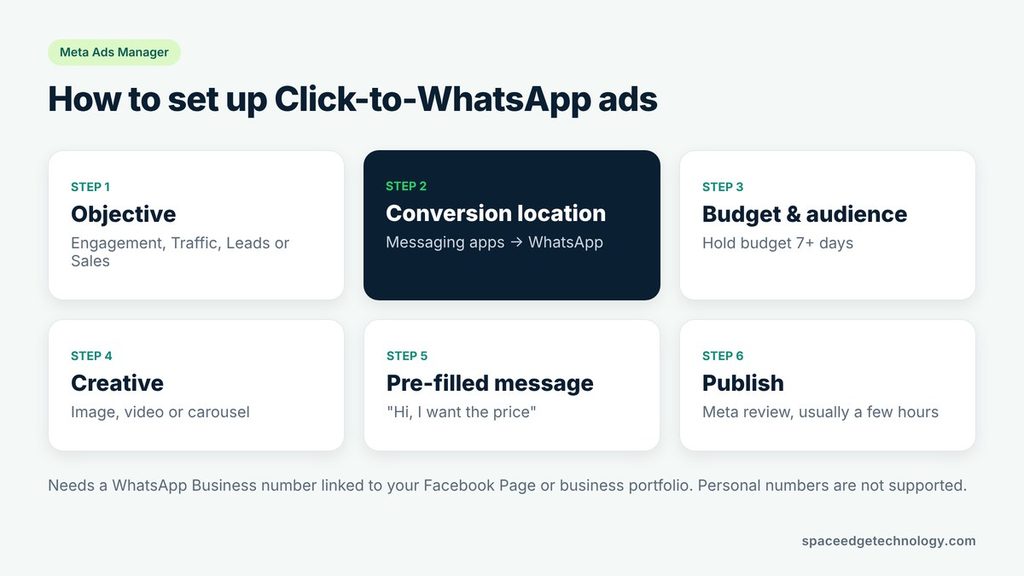
What You Need Before You Start
- A WhatsApp Business number. Personal WhatsApp numbers do not work for these ads. If you do not want to use your own mobile number, a dedicated virtual number works well.
- A Facebook Page for your business.
- A Meta Business Manager (now called a business portfolio) with an active ad account and a payment method.
- All three linked under the same business portfolio. Your WhatsApp number must be connected to your Page or portfolio.
- A catalog set up and approved, if you plan to show products.
Step 1: Create a Campaign and Pick an Objective
Go to Meta Ads Manager and click + Create. Meta lets you send people to WhatsApp with several objectives:
- Engagement: The most common choice. Meta finds people likely to start a chat.
- Traffic: Useful when you want low-cost clicks to WhatsApp.
- Leads: Good for service businesses that want to qualify buyers in chat.
- Sales: Best when you have the Meta Pixel and Conversions API tracking purchases.
- Awareness: For reach, with WhatsApp as the destination.
If you are new, start with Engagement. It gives Meta a clear signal: find people who will message you.
Step 2: Set WhatsApp as the Conversion Location
At the ad set level, find the Conversion section. Choose Messaging apps (some accounts call it Message destinations) and select WhatsApp. If WhatsApp is grayed out, click Connect account and link your number.
Step 3: Set Your Budget and Schedule
Pick a daily budget you can hold for at least 7 days. Meta’s system needs time and enough results to leave its learning phase. Changing the budget every day resets that learning and wastes money.
Step 4: Choose Your Audience
Set location, age, gender and language. Then add interests or use custom audiences. Strong options include:
- People who visited your website (needs the Meta Pixel)
- People who engaged with your Instagram or Facebook page
- Past customers uploaded as a list
- Lookalike audiences built from your best buyers
Warm audiences usually convert faster. Cold audiences can work, but they need a stronger offer and a better first reply.
Step 5: Build the Creative
Use a single image, a video or a carousel. Short vertical videos often do well on Reels and Stories. Show the product in use, state the offer clearly and tell people what happens next, such as “Tap to chat and get the price in 1 minute.” Our social media marketing team can help you plan creatives that stop the scroll.
Step 6: Write the Pre-Filled Message and Ice Breakers
This is the step most people skip, and it matters most. When WhatsApp opens, the buyer sees a message ready to send. Meta lets you edit this text and add a few starter questions, often called ice breakers.
Good examples:
- “Hi, I want the price of the summer dress.”
- “Show me today’s offers.”
- “Is delivery available in my area?”
A clear opener tells you what the buyer wants before you even reply. It also makes your auto-reply or chatbot smarter.
Step 7: Review and Publish
Check the preview, add tracking if you use it and publish. Meta reviews ads before they go live, which usually takes a few hours.
Can You Show Your Catalog Inside the Ad?
Yes. Businesses using the API with a connected catalog can run ads that show products and lead into WhatsApp. This is useful when you want a buyer to see several products before they tap. If you want help running these, our Meta and Google ads management team sets them up and tracks every rupee.
Click-to-WhatsApp Ads Cost and WhatsApp Pricing in 2026
There are two costs to plan for: what you pay Meta for the ad, and what you pay for WhatsApp messages.
Ad Cost
You pay for the ad like any other Meta ad. The price depends on your audience, your industry, the season and how good your creative is. Track “cost per messaging conversation started” to see what each new chat costs you.
WhatsApp Message Cost: The Per-Message Model
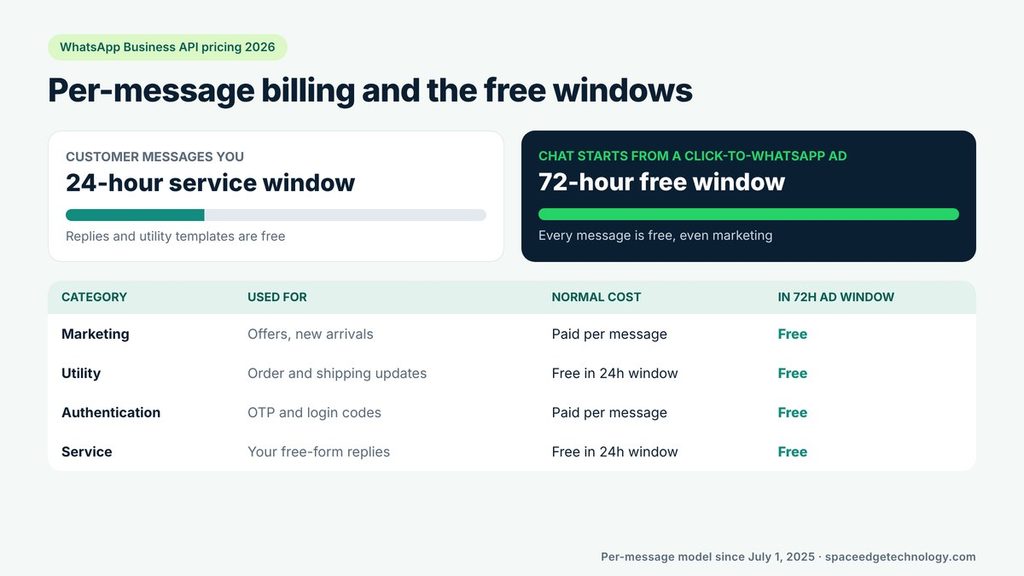
Since July 1, 2025, Meta charges the WhatsApp Business Platform per delivered template message, not per 24-hour conversation. Messages fall into four groups:
| Message type | What it is for | When you pay |
|---|---|---|
| Marketing | Offers, new arrivals, reminders to buy | Each delivered message, unless it falls in a free window |
| Utility | Order confirmations, shipping updates, appointment reminders | Free inside an open service window; paid outside it |
| Authentication | One-time passwords and login codes | Each delivered message |
| Service | Your free-form replies to a customer | Free inside the 24-hour window |
Rates change by country. Volume discounts apply to some categories once you send enough messages in one country. Always check Meta’s official pricing page or your provider’s rate card for current numbers.
The free WhatsApp Business app does not charge these per-message fees. They apply to the API.
The 24-Hour Service Window
When a customer messages you, a 24-hour window opens. Inside that window, your normal replies are free. Utility templates sent inside the window are free too. Each new message from the customer restarts the 24-hour clock.
The 72-Hour Free Window From Click-to-WhatsApp Ads
This is the biggest money saver of 2026. When someone starts a chat by tapping a Click-to-WhatsApp ad or a Facebook Page call-to-action button, a 72-hour free entry point window opens. During those 72 hours, every message you send to that person is free, including marketing templates.
That means one ad click gives you three full days to answer questions, share products, send an offer and follow up, all without message fees. Plan your follow-up sequence to fit inside those three days.
A Simple Cost-Saving Plan
- Bring new buyers in through Click-to-WhatsApp ads to get the 72-hour window.
- Reply fast so the buyer keeps chatting and the window stays useful.
- Send your offer, product links and a reminder inside the 72 hours.
- After that, send only messages that add value, such as order updates or real offers.
- Respect local limits. Some countries cap how many marketing templates one person can receive in a day.
How to Turn WhatsApp Chats Into Sales
A chat is not a sale. What you do in the first few minutes decides whether the buyer pays or goes quiet.
Reply Within Minutes
Speed wins. A buyer who tapped your ad is hot right now. If they wait an hour, they may have bought from someone else. Use an auto-reply or chatbot to answer at once, then hand over to a person for complex questions.
Use a Simple Chat Script
Keep a short, friendly script so every buyer gets the same good experience:
- Greet and confirm: “Hi Priya, thanks for reaching out. You asked about the summer dress, right?”
- Show options: Send the right collection or two or three products from the catalog.
- Answer and reassure: Share size, delivery time, return policy and reviews.
- Make the offer: “Order today and get free delivery.”
- Close: Send the payment link or confirm cash on delivery.
- Confirm and thank: Send an order confirmation with the expected delivery date.
Send Products, Not Long Paragraphs
Do not type long product details. Send the catalog item. It shows the photo, price and description in one tap and looks more professional. For buyers who are comparing, send a short list of two or three products so they can choose.
Make Paying Easy
The fewer steps, the more sales. Offer a payment link, a UPI option or cash on delivery where that fits your market. If you take cash on delivery, send a quick confirmation message before you ship to cut fake orders.
Recover Abandoned Carts
Some buyers add items to the cart and stop. Send a friendly reminder, ideally inside the free window: “You left the navy kurta in your cart. Want me to hold your size?” A short, helpful nudge brings many of them back.
Follow Up Without Spamming
After the sale, send order updates and a thank-you. Ask for a review. Later, send offers only to people who opted in, and only when the offer is genuinely useful. For people who do not reply on WhatsApp, back up your follow-up with bulk SMS or bulk email marketing.
How to Track Results From Click-to-WhatsApp Ads
You cannot improve what you do not measure. Many businesses only look at clicks. Clicks do not pay the bills. Sales do.
Metrics to Watch in Ads Manager
In Ads Manager, open Columns, then Customize columns, then Messaging. Add these:
- Messaging conversations started: How many chats your ad created. This is your main number.
- Cost per messaging conversation started: What each new chat cost you.
- New messaging contacts: People who never messaged you before.
- Click-through rate: How many people who saw the ad tapped it.
Metrics to Track in Your Chats
Ads Manager stops at the chat. You need to track what happens after:
- Reply rate: How many buyers answer your first message.
- Chat-to-order rate: How many chats turn into orders.
- Average order value: How much each order is worth.
- Cost per sale: Total ad spend divided by orders from WhatsApp.
- Return on ad spend (ROAS): Revenue from WhatsApp orders divided by ad spend.
An easy way to start: tag every chat that came from an ad, and mark it “ordered” or “not ordered” at the end of the day. API users can automate this with a CRM and send purchase events back to Meta through the Conversions API. That helps Meta find more people who buy, not just people who chat.
A Simple Way to Test
Change one thing at a time. Run two creatives with the same audience, or two audiences with the same creative. Give each test at least a few days. Keep the winner and test the next idea.
Common Mistakes That Kill WhatsApp Sales
Most failed campaigns make the same few mistakes. Avoid these and you are ahead of most competitors.
- Slow replies. A buyer who waits loses interest. Set up instant replies and staff the inbox during ad hours.
- No pre-filled message. A blank chat makes the buyer think. A clear opener gets more people to tap send.
- Empty or messy catalog. No prices, blurry photos or sold-out items make buyers leave.
- Sending the same message to everyone. Personalize at least the name and the product they asked about.
- Too many marketing messages. People block or report businesses that spam. Too many blocks can lower your number’s quality rating and limit how many messages you can send.
- Ignoring the 72-hour window. Waiting four days to follow up means you pay for a message you could have sent for free.
- Judging ads by clicks. Cheap clicks with no orders are not a win. Track cost per sale.
- No opt-in. Always get permission before sending marketing messages. It is both a WhatsApp rule and good manners.
For more ideas, read our guide to WhatsApp marketing strategies that lift engagement and conversions.
Who Should Use WhatsApp Catalogs and Click-to-WhatsApp Ads?
Almost any business that sells to people who use WhatsApp can benefit. A few examples:
| Business type | How they use it |
|---|---|
| Fashion and jewellery | Show new collections, share size charts, take orders in chat |
| Restaurants and bakeries | Share a menu as a catalog, take orders for delivery or pickup |
| Real estate | Send project details, floor plans and site visit slots |
| Education and coaching | Answer course questions, share fees, book demo classes |
| Healthcare and clinics | Book appointments, send reminders, share service lists |
| Travel agencies | Share tour packages, answer date and price questions |
| B2B and IT services | Qualify leads, share brochures, book discovery calls |
| Local shops | Share daily offers and take home delivery orders |
Service businesses can use the catalog too. List each service as an item, with a starting price and a short description. B2B and tech firms can learn more in our post on WhatsApp for IT companies.
WhatsApp Catalog vs Website: Do You Still Need a Website?
Yes. A WhatsApp catalog is a great shop window, but it does not replace a website.
Your website ranks on Google, builds long-term trust and holds your full product range, policies and reviews. Your WhatsApp catalog makes it easy to buy in a chat. The best setups link the two. Each catalog item links to its product page, and the website has a WhatsApp chat button.
If your site is slow or hard to use on a phone, fix that first. A conversion-focused website makes every channel work harder, including WhatsApp.
WhatsApp Commerce Trends to Watch in 2026
Conversational commerce keeps growing. A few shifts stand out this year:
- Per-message billing is now standard. Businesses can see the cost of each message and plan more precisely.
- Free entry windows reward ads. The 72-hour window makes Click-to-WhatsApp ads a cheaper way to start sales chats than cold marketing messages.
- AI chatbots handle first replies. More brands let a bot greet buyers, share the catalog and answer common questions, then hand over to a person to close.
- Catalogs sync with online stores. Store syncs keep prices and stock up to date without manual work.
- Stricter limits on spam. Meta keeps tightening rules on how often a business can send marketing messages to the same person. Quality beats volume.
Conclusion: Start Small, Then Scale
WhatsApp catalogs and Click-to-WhatsApp ads give you a simple path from ad to sale. The ad starts the chat. The catalog shows what to buy. Fast, friendly replies close the deal. And in 2026, the 72-hour free window makes the follow-up cheaper than ever.
Here is a simple plan to start this week:
- Set up your WhatsApp Business account and catalog with your top 20 products.
- Group them into three or four collections.
- Write a greeting, a few quick replies and a clear pre-filled message.
- Launch one Click-to-WhatsApp ad with an Engagement objective and a modest daily budget.
- Reply within minutes, send catalog items and close with an easy payment option.
- Track cost per sale for two weeks, then scale what works.
Growth also needs people to find you without ads. Pair WhatsApp with strong SEO services so buyers discover you on Google too.
Want experts to set up your catalog, ads and chatbot? Contact our team for a free audit, and we will show you exactly where your next sales can come from.
Frequently Asked Questions
What is a Click-to-WhatsApp ad?
A Click-to-WhatsApp ad is a Facebook or Instagram ad with a button that opens a WhatsApp chat with your business. The buyer taps the button, WhatsApp opens with a ready message, and they can start talking to you right away.
How much do Click-to-WhatsApp ads cost?
You pay Meta for the ad based on your budget, audience and competition. Messages are free for 72 hours after a buyer starts a chat from the ad, including marketing messages. After that, API users pay per delivered template message at their country’s rate.
What is the 72-hour free window on WhatsApp?
It is a free entry point window. When someone messages you through a Click-to-WhatsApp ad or a Facebook Page call-to-action button, every message you send them for the next 72 hours is free. This includes marketing, utility and service messages.
How do I create a WhatsApp catalog?
Open the WhatsApp Business app, go to Business tools, tap Catalog and then Add new item. Add photos, a name, price and description, and save. API users create the catalog in Meta Commerce Manager and connect it to their WhatsApp Business Account.
How many products can I add to a WhatsApp catalog?
The WhatsApp Business app allows up to 500 products. API users manage catalogs in Meta Commerce Manager, where limits can be different, so check your account for the current number.
Can I run Click-to-WhatsApp ads with a personal WhatsApp number?
No. You need a WhatsApp Business app number or a WhatsApp Business Platform (API) number connected to your Facebook Page or business portfolio.
Do I need the WhatsApp Business API for Click-to-WhatsApp ads?
No. You can run these ads with the free WhatsApp Business app. The API is better for high chat volumes, teams, chatbots, full carts and connecting WhatsApp to your CRM or store.
Which objective is best for Click-to-WhatsApp ads?
Engagement is the most common starting point because Meta looks for people likely to message you. Use Sales when you track purchases with the Meta Pixel and Conversions API, and Leads for service businesses that qualify buyers in chat.
Can customers pay inside WhatsApp?
It depends on your country and setup. Many businesses send a payment link, a UPI request or offer cash on delivery after the buyer sends their cart. Check what WhatsApp supports in your market.
Is WhatsApp marketing better than email marketing?
They do different jobs. WhatsApp is faster and more personal, so it works well for quick sales and support. Email is better for long content and newsletters. Most brands get the best results by using both.
How do I get more sales from WhatsApp?
Reply within minutes, send catalog items instead of long text, make paying easy, recover abandoned carts and follow up inside the 72-hour free window. Track cost per sale, not just clicks.