
Quick answer: Regional language SEO means making your website rank on Google when people search in Hindi, Tamil, Bengali, Marathi, Telugu or any other Indian language. It is India’s next big opportunity because most new internet users come from small towns and villages, many prefer their own language, and Google now gives AI answers in Indian languages. Yet very few business websites offer good content in these languages. That gap means less competition, cheaper traffic and more trust for brands that move first.
Think about the last time you asked your phone something in Hindi. Maybe you said “paas mein dentist kahan hai” or typed “sasta loan kaise milega”. Millions of Indians do this every day. But when they search, they often land on English pages, poor translations or videos. They want a clear answer in their own words. Most websites still don’t give it to them.
This guide explains why that is changing fast. You will learn what regional language SEO is, why it matters now, how AI search and voice search change the game, and exactly how to start. We have kept the language simple, so anyone can follow along. If you want expert help after reading, our team at SpaceEdge Technology offers SEO services for Hindi and English websites.
What Is Regional Language SEO?
Regional language SEO is the work of helping your web pages show up in search results when people search in an Indian language. It is also called vernacular SEO, Indian language SEO or multilingual SEO.
Regular SEO focuses on English words like “best dentist in Delhi”. Regional language SEO focuses on how real people search in their own language. That could be:
- Native script: “दिल्ली में सबसे अच्छा डेंटिस्ट” (Hindi in Devanagari)
- Roman script (Hinglish): “delhi mein best dentist”
- Mixed language: “best dentist near me Hindi mein batao”
- Voice questions: “Mere ghar ke paas daant ka doctor kaun hai?”
A good regional SEO plan covers all four. It is not just translation. It is about speaking the way your customers speak.
Hindi SEO vs regional language SEO
Hindi SEO is one part of regional language SEO. Hindi has the biggest reach, so most brands start there. But Tamil, Telugu, Bengali, Marathi, Kannada, Malayalam, Gujarati, Punjabi and Odia also have huge audiences. If your customers live in one state, that state’s language may matter more than Hindi.
How it is different from translation
Translation changes words from one language to another. SEO in a regional language starts with what people actually type or speak. For example, many Hindi speakers search “mobile recharge” rather than a pure Hindi word for it. A word-for-word translation would miss that. Good regional content uses the words people really use, even if some are English.
Why This Is Happening Now
India’s internet story has moved from big cities to small towns. The next group of users thinks, reads and searches in its own language. Three big changes are pushing this shift.
1. The next wave of users is rural and local
Most new internet users in India now come from rural areas. These users are often first-time smartphone owners. Many are more comfortable in Hindi or their state language than in English.
2. Cheap data made the internet daily habit
Low-cost mobile data turned the internet into a daily tool. People now use it to shop, learn, bank, find jobs and get local services. Each of these tasks starts with a search, and many of those searches happen in a local language.
3. Search engines now understand Indian languages
Google has improved a lot at understanding Hindi and other Indian languages. It now shows AI-written answers in several of them. This means your local-language page can be picked up and quoted in AI results, not just in the blue links.
The Numbers Behind the Shift
The data makes the case clearly. Here are the most useful figures for any business owner or marketer.
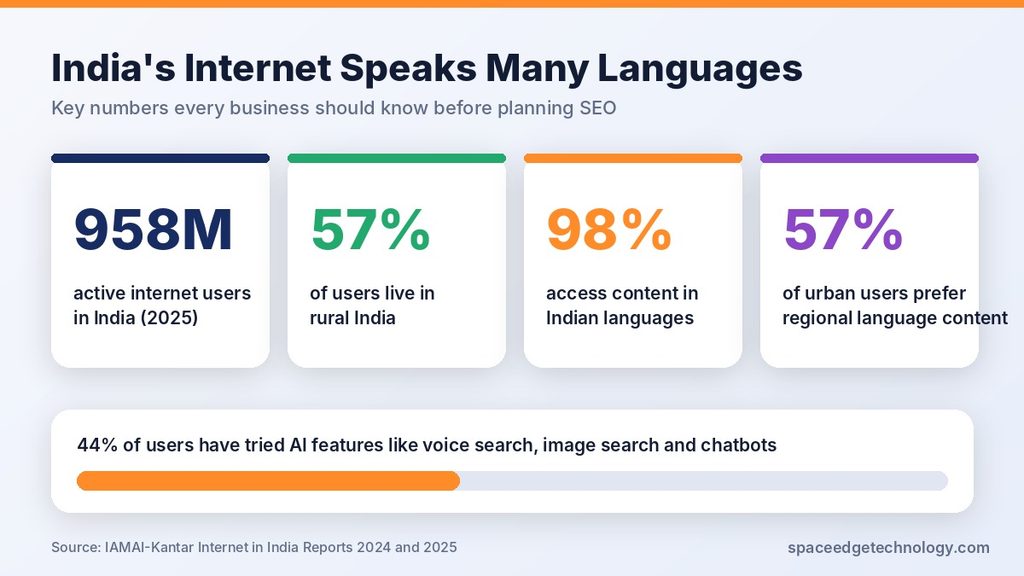
| Fact | Figure | Source |
|---|---|---|
| Active internet users in India (2025) | 958 million, up about 8% in a year | IAMAI-Kantar, Internet in India Report 2025 |
| Share of users from rural India | 57%, about 548 million people | IAMAI-Kantar, 2025 |
| Users who tried AI features like voice or image search | 44% | IAMAI-Kantar, 2025 |
| Users who accessed content in Indic languages | 98% | IAMAI-Kantar, Internet in India Report 2024 |
| Urban users who prefer regional language content | 57% | IAMAI-Kantar, 2024 |
| People offline who cite lack of local language content as a reason | 13% | IAMAI-Kantar, 2024 |
| Indians who speak Hindi | About 44% of the population | Census 2011 |
| Hindi speakers worldwide | About 609 million, third most spoken language | Ethnologue |
Look at the 57% figure for urban users. Even in cities, more than half of people prefer regional content. In rural India, the pull toward local language is usually even stronger.
Now think about supply. Most business websites in India are still English-only. Demand is huge, but supply is thin. That imbalance is what makes this an opportunity.
What this means in plain words
- Nearly a billion people are online in India.
- More than half of them live outside big cities.
- Almost all of them consume some content in Indian languages.
- Very few businesses serve them well in those languages.
If you sell anything to everyday Indians, this is your audience. And right now, the road to reach them is wide open.
How AI Search and Voice Search Change the Game
Search is no longer just ten blue links. Google, ChatGPT, Perplexity and Gemini now write direct answers. In India, these AI answers are arriving in local languages too. That changes who wins.
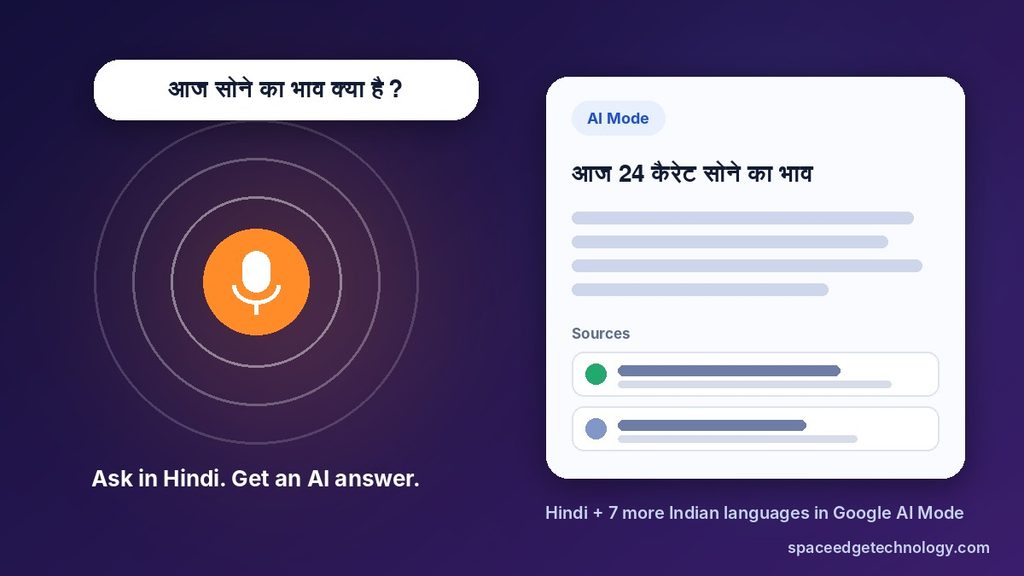
Google AI Overviews and AI Mode in Indian languages
Google brought AI Overviews to India in August 2024 in both English and Hindi. Google also said Indian users listen to AI Overview answers more often than users in other countries. That tells you voice and audio matter a lot here.
In September 2025, Google added Hindi to AI Mode, its chat-style search. A month later, it added seven more Indian languages: Bengali, Kannada, Malayalam, Marathi, Tamil, Telugu and Urdu. Google also launched Search Live in India in English and Hindi, letting people talk to search in real time.
Why does this matter for you? AI answers pull facts from web pages. If the best Hindi page on a topic is yours, there is a good chance the AI uses it. If no good Hindi page exists, the AI may lean on a translated English page from a competitor or a video.
How to get picked by AI answer engines
AI tools like clear, trusted and well-organised pages. To raise your chances:
- Answer the main question in the first two or three sentences.
- Use simple headings that match real questions.
- Add short lists and tables for steps, prices and comparisons.
- Show who wrote the page and why they know the topic.
- Keep facts current and link to reliable sources.
- Add FAQ sections with natural questions in the target language.
This is called answer engine optimisation, or AEO. It works in Hindi the same way it works in English. The difference is that the Hindi field is far less crowded.
Voice search is the front door for many users
Many new users find typing hard. Indian scripts can be slow on a phone keyboard, and some users have limited reading skills. Speaking is easier. So they tap the mic and ask.
The latest IAMAI-Kantar report found that 44% of Indian internet users have used AI features such as voice search, image search or chatbots. That is a big base, and it keeps growing.
Voice searches look different from typed ones:
| Typed search | Voice search |
|---|---|
| ac repair noida | Noida mein AC repair karne wala kaun hai? |
| gold rate today | Aaj sone ka bhav kya hai? |
| best phone under 15000 | 15 hazaar ke andar sabse achha phone kaun sa hai? |
Voice queries are longer, more natural and often framed as questions. They also tend to have local intent. Pages that answer these exact questions in plain language have a strong edge.
Optimising for Hindi voice search
- Write headings as full questions people say out loud.
- Give a short, direct answer of 30 to 50 words below each question.
- Use conversational words, including common English words people mix in.
- Keep your Google Business Profile complete, with your name, address and phone in local language where it fits.
- Make pages load fast on low-cost phones and slow networks.
If your business also uses calls to reach customers, our voice call campaigns can deliver recorded messages in Hindi or any regional language.
Benefits of Regional Language SEO for Businesses
Moving into Hindi and regional languages is not just good for reach. It brings real business gains.
Less competition, faster rankings
English keywords in India are crowded. Big brands, news sites and marketplaces fight for every spot. In Hindi and other Indian languages, far fewer quality pages exist. A well-built page can often rank faster and with fewer backlinks.
Lower cost per lead
When fewer advertisers bid on a keyword, ads cost less. The same is often true for organic traffic. You need less effort to reach page one, so each visitor costs less over time. You can test this quickly by running small Google Ads campaigns on Hindi keywords and comparing the cost per click with English terms.
More trust and better conversions
People trust what they understand. A clear answer in someone’s mother tongue feels personal. It reduces doubt, especially for money, health, legal or education topics. Better trust usually means more calls, forms and sales.
Access to Bharat’s buying power
Small-town India is spending more online every year. Rural users now make up 57% of internet users. Brands that speak their language early build loyalty before the market gets crowded.
Better visibility in AI and voice results
As covered above, AI tools and voice assistants now answer in Indian languages. Local-language content gives them something good to quote. That puts your brand inside the answer, not just below it.
Stronger local SEO
If you serve one city or state, regional language pages help you rank for “near me” style searches in that area. They also match how people speak to Google Maps and voice assistants.
Challenges You Should Know About
Regional language SEO is a big opportunity, but it has hurdles. Knowing them helps you plan better.
Low keyword data
Keyword tools show less data for Indian languages. Many searches are in Roman script or mixed language, which tools may group oddly. You will need to combine tools with real customer research.
Hinglish and script mixing
One person types “loan kaise le”. Another types “लोन कैसे लें”. A third says “how to take loan Hindi mein”. All want the same thing. Your page should cover these variations naturally without stuffing keywords.
Quality of translation
Machine translation alone often sounds stiff or wrong. Google’s guidance on helpful content rewards pages made for people. Poor auto-translated pages can hurt trust and rankings. Use native writers or careful human editing.
Technical setup
Sites with many languages need the right structure. Without hreflang tags and clean URLs, Google may show the wrong language to users. Fonts must also display Indian scripts correctly on all devices.
Measuring results
Analytics tools may not split traffic by language by default. You will need to set up folders or filters to track each language version separately.
None of these are deal breakers. The next section shows how to handle each one.
How to Start Regional Language SEO: A 7-Step Plan
You don’t need to rebuild your whole website on day one. Start small, learn fast and grow what works. Here is a simple plan any business can follow.
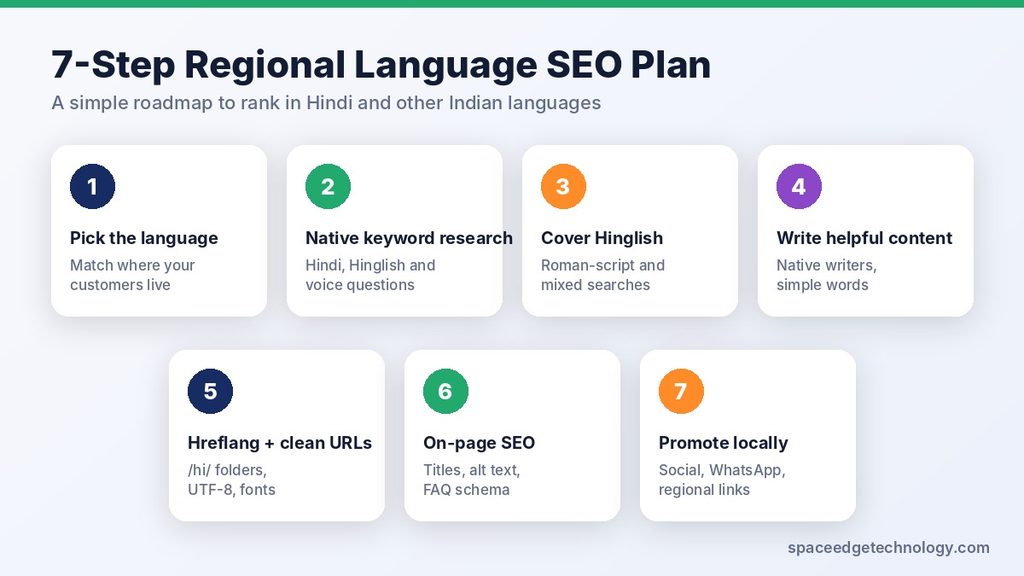
Step 1: Pick the right language first
Choose based on where your customers are, not on guesswork.
- Selling across North and Central India? Start with Hindi.
- Serving one state? Start with that state’s main language, such as Tamil, Marathi or Bengali.
- Unsure? Check Google Analytics for visitor locations and Google Search Console for non-English queries you already get.
One language done well beats five done badly.
Step 2: Do native Hindi keyword research
Never just translate your English keyword list. Instead, find out how people really search.
- Type your topic into Google in Hindi and Hinglish. Note the autocomplete suggestions.
- Check the “People also ask” box for real questions.
- Use Google Keyword Planner with the language set to Hindi and location set to India.
- Use Google Trends to compare terms, such as “loan” vs “ऋण”.
- Ask your sales or support team what words customers use on calls.
Make three lists: Devanagari terms, Roman-script Hinglish terms and voice-style questions.
Step 3: Understand Hinglish keywords
Hinglish is a mix of Hindi and English. It is how a huge number of Indians type. Examples include “ghar baithe paise kaise kamaye” or “best coaching near me Hindi”.
You can serve Hinglish users in two ways. You can write your Hindi pages in Devanagari and naturally include common English words. Or you can create helpful Roman-script content for very popular Hinglish queries. Test both and see which your audience prefers.
Step 4: Create helpful, native content
This is the most important step. Google’s helpful content guidance rewards pages written for people, by people who know the topic.
- Hire or work with native speakers who understand your industry.
- Write simple sentences. Use words people speak, not textbook language.
- Add local examples, prices in rupees and real places.
- Answer the main question at the top of each page.
- Show the author’s name, role and experience to build E-E-A-T.
- Update pages when facts or prices change.
If you use AI or translation tools to draft, always have a native editor review and rewrite. The final page should read as if it was first written in that language.
Step 5: Set up hreflang and clean URLs
The technical setup tells Google which page is in which language. It also helps Google show the right version to each user.
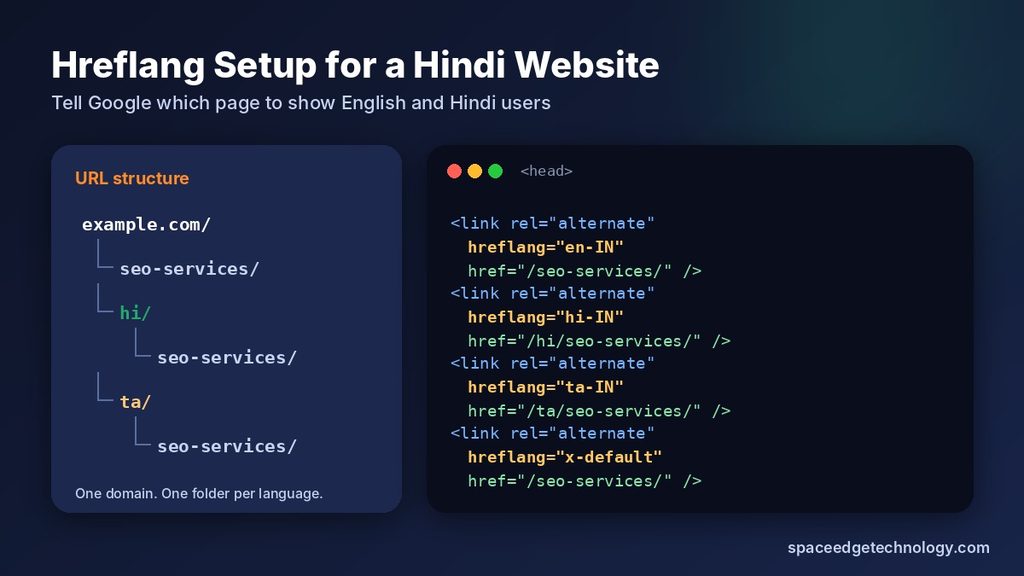
Use a clear URL structure. The simplest choice for most sites is a sub-folder:
- English: example.com/seo-services/
- Hindi: example.com/hi/seo-services/
Add hreflang tags. Place these in the head section of both pages:
<link rel="alternate" hreflang="en-IN" href="https://example.com/seo-services/" />
<link rel="alternate" hreflang="hi-IN" href="https://example.com/hi/seo-services/" />
<link rel="alternate" hreflang="x-default" href="https://example.com/seo-services/" />
Other technical checks:
- Use UTF-8 encoding so Devanagari and other scripts display correctly.
- Load Google Fonts that support Indian scripts, such as Noto Sans Devanagari.
- Set the right language in the HTML tag, for example lang=”hi”.
- Add a language switcher that users can find easily.
- Submit each language version in your XML sitemap.
- Keep pages fast on budget phones. Compress images and avoid heavy scripts.
WordPress users can use plugins like WPML or Polylang to handle much of this. If your site needs a rebuild, a mobile-first website design makes multi-language setup much easier.
Step 6: Optimise each page on-page
Each regional page needs its own SEO work, just like an English page.
- Write the title tag and meta description in the target language.
- Use the main keyword in the H1, first paragraph and one subheading.
- Write image alt text in the same language as the page.
- Add FAQ schema with questions in that language.
- Link to other pages in the same language, so users stay in one language.
- Keep URLs short. Roman-script URLs are often easier to share than encoded Devanagari ones.
Step 7: Promote and build local authority
Great content still needs signals of trust. Build them in ways that fit regional audiences.
- Share your Hindi or regional content on Facebook, Instagram and YouTube with social media marketing aimed at that audience.
- Get mentions from regional news sites, local directories and industry groups.
- Make short videos that link back to your article.
- Send helpful links to customers through WhatsApp marketing or bulk SMS in Hindi.
- Encourage customer reviews in local language on your Google Business Profile.
Useful Tools for Hindi and Regional SEO
You don’t need costly software to start. These tools cover most needs:
| Tool | What it helps with | Cost |
|---|---|---|
| Google Search Console | See which Hindi and regional queries already bring traffic | Free |
| Google Keyword Planner | Find keyword ideas by language and location | Free with Ads account |
| Google Trends | Compare popularity of Hindi, Hinglish and English terms | Free |
| Google Analytics 4 | Track traffic and conversions by language folder | Free |
| Google Input Tools / Gboard | Type quickly in Indian scripts | Free |
| WPML or Polylang | Manage languages and hreflang on WordPress | Free and paid plans |
| Ahrefs or Semrush | Deeper keyword and competitor research | Paid |
How to Measure Success
Track results for each language on its own. This shows what is really working.
- Impressions and clicks for the /hi/ or other language folder in Search Console.
- Rankings for your top 20 regional keywords.
- AI and featured snippet visibility by checking key questions in Google and AI tools each month.
- Engagement, such as time on page and scroll depth.
- Conversions, like calls, WhatsApp chats, form fills and sales from regional pages.
- Cost per lead compared with English pages.
Give it time. Most sites see early movement in three to four months, with stronger growth over six to twelve months. Regional pages often move faster because there is less competition.
Common Mistakes to Avoid
- Auto-translating the whole site. It reads badly and can break trust.
- Translating keywords instead of researching them. People don’t search in textbook Hindi.
- Mixing languages on one page randomly. Keep each page in one main language, with natural loan words.
- Skipping hreflang. Google may show the wrong version or treat pages as duplicates.
- Forgetting mobile speed. Many regional users are on budget phones and slower networks.
- Ignoring local trust signals. Reviews, local phone numbers and real addresses matter a lot.
- Launching and forgetting. Update content, check rankings and fix gaps every month.
Which Industries Gain the Most?
Almost every business that sells to everyday Indians can benefit. Some gain faster than others because their customers search in local language for high-value needs.
Education and coaching
Students in small towns search for exam tips, syllabus details and coaching in Hindi and state languages. Queries like “SSC ki taiyari kaise kare” have huge demand. A coaching centre with clear Hindi guides can attract students from far beyond its city.
Banking, loans and insurance
Money topics need trust. People want to understand interest rates, EMI and claim steps in words they fully follow. Simple Hindi or Marathi explainers reduce fear and bring more applications. Always keep these pages accurate and reviewed by an expert.
Healthcare and clinics
Patients often describe symptoms in their own language. A clinic page that explains treatments, costs and timings in Hindi or Tamil feels more caring. It also matches voice searches like “pet dard ka ilaj kahan hoga”.
Real estate
Buyers in tier 2 and tier 3 cities search for plots, flats and home loans in local language. Area guides and price explainers in Hindi help builders reach serious local buyers.
Ecommerce and retail
Product pages, buying guides and size charts in regional languages help first-time online shoppers feel safe. This lowers returns and abandoned carts.
Local services
Plumbers, AC repair, salons, tutors and caterers get many “near me” searches in Hinglish and Hindi. A simple local-language service page with a phone number and WhatsApp button can turn searches into calls the same day.
Government services and political outreach
People search for schemes, forms and eligibility in their own language. Clear regional pages, backed by SMS and voice outreach, help organisations reach citizens who don’t use English.
Beyond Search: Make Every Channel Speak the Same Language
SEO brings people in. Other channels keep them engaged. When your website speaks Hindi but your messages don’t, the experience breaks.
Use the same language across your website, ads, social posts, WhatsApp chats, SMS and support calls. A customer who reads your Hindi article should get a Hindi follow-up message too. This joined-up approach builds trust and lifts conversions across the whole funnel.
Conclusion: The Window Is Open, But Not Forever
India has nearly a billion internet users. Most new users come from small towns. Almost all of them read content in Indian languages, and Google now answers them in those languages with AI. Yet most business websites still speak only English.
That gap is the opportunity. Brands that build helpful Hindi and regional language content today will be the ones AI tools quote and customers trust tomorrow. Those who wait will face the same crowded race they face in English now.
Start with one language. Research how your customers really search. Write pages that sound natural. Set up the technical basics. Measure, learn and grow.
Want help with regional language SEO? SpaceEdge Technology has helped Indian businesses grow online since 2008. Explore our SEO services, read more SEO guides on our blog, or contact our team for a free audit of your website.
Frequently Asked Questions
What is regional language SEO?
Regional language SEO is the process of making your website rank on Google for searches in Indian languages like Hindi, Tamil, Telugu, Bengali and Marathi. It includes native keyword research, local-language content, hreflang setup and on-page optimisation in that language.
Is Hindi SEO worth it for my business?
Yes, if your customers live in Hindi-speaking regions or small towns. Competition for Hindi keywords is much lower than for English, so you can often rank faster and get cheaper leads. It also builds trust with people who prefer their own language.
Does Google rank Hindi websites?
Yes. Google fully supports Hindi in search, AI Overviews and AI Mode. Hindi pages can rank on page one and appear in AI answers, as long as they are helpful, well written and technically sound.
How do I rank my Hindi website on Google?
Research real Hindi and Hinglish keywords, write helpful content with native writers, add hreflang tags, optimise titles and meta descriptions in Hindi, make the site fast on mobile and earn links from regional sites. Track progress in Google Search Console.
Should I write in Devanagari or Hinglish?
Use Devanagari for your main Hindi pages, and include common English words people naturally use. For very popular Roman-script searches, you can add helpful Hinglish content too. Check Search Console to see which style brings more clicks.
What is the difference between vernacular SEO and multilingual SEO?
Vernacular SEO usually means SEO in local Indian languages. Multilingual SEO is the wider practice of running SEO for a website in two or more languages. In India, the two terms are often used to mean the same thing.
Do I need a separate website for each language?
No. Most businesses use one website with sub-folders, like /hi/ for Hindi. This keeps your domain authority in one place and is easier to manage. Use hreflang tags to link each language version.
Can I use Google Translate for my Hindi pages?
You can use it for a first draft, but never publish it as is. Machine translation often sounds unnatural and misses the words people really search. Always have a native speaker edit the content so it reads naturally and helps users.
Which Indian language is best for SEO after Hindi?
It depends on your market. Bengali, Marathi, Telugu and Tamil all have very large audiences and are supported in Google AI Mode. Pick the language spoken in the states where most of your customers live.
How long does regional language SEO take to show results?
Most websites see early ranking movement in three to four months. Stronger, steady traffic usually comes in six to twelve months. Regional pages may move faster because fewer competitors target those keywords.
FAQ schema (paste in a Custom HTML block or your SEO plugin)
<script type="application/ld+json">
{
  "@context": "https://schema.org",
  "@type": "FAQPage",
  "mainEntity": [
    {"@type": "Question", "name": "What is regional language SEO?", "acceptedAnswer": {"@type": "Answer", "text": "Regional language SEO is the process of making your website rank on Google for searches in Indian languages like Hindi, Tamil, Telugu, Bengali and Marathi. It includes native keyword research, local-language content, hreflang setup and on-page optimisation in that language."}},
    {"@type": "Question", "name": "Is Hindi SEO worth it for my business?", "acceptedAnswer": {"@type": "Answer", "text": "Yes, if your customers live in Hindi-speaking regions or small towns. Competition for Hindi keywords is much lower than for English, so you can often rank faster and get cheaper leads."}},
    {"@type": "Question", "name": "Does Google rank Hindi websites?", "acceptedAnswer": {"@type": "Answer", "text": "Yes. Google fully supports Hindi in search, AI Overviews and AI Mode. Hindi pages can rank on page one and appear in AI answers if they are helpful, well written and technically sound."}},
    {"@type": "Question", "name": "How do I rank my Hindi website on Google?", "acceptedAnswer": {"@type": "Answer", "text": "Research real Hindi and Hinglish keywords, write helpful content with native writers, add hreflang tags, optimise titles and meta descriptions in Hindi, make the site fast on mobile and earn links from regional sites."}},
    {"@type": "Question", "name": "Do I need a separate website for each language?", "acceptedAnswer": {"@type": "Answer", "text": "No. Most businesses use one website with sub-folders, like /hi/ for Hindi, and link each language version with hreflang tags."}},
    {"@type": "Question", "name": "How long does regional language SEO take to show results?", "acceptedAnswer": {"@type": "Answer", "text": "Most websites see early ranking movement in three to four months and stronger traffic in six to twelve months. Regional pages may move faster because there is less competition."}}
  ]
}
</script>