
Quick answer
Google Ads for small business in India is a pay-per-click system that puts your business at the top of Google Search, Maps and YouTube when people look for what you sell. There is no minimum budget. Most clicks in India cost between ₹5 and ₹150, depending on your industry and city. A small business can start with ₹300 to ₹500 a day, but ₹15,000 to ₹30,000 a month gives Google enough data to learn. New advertisers can also earn free ad credit by spending a matching amount in their first 60 days. Start with a Search campaign, track calls and form fills, and add Performance Max once you have steady results.
That is the short version. The rest of this guide shows you real costs, how the free credit works, which campaign to pick, and how to set up your first campaign without wasting money.
What is Google Ads and how does it work in India?
Google Ads is Google’s paid advertising platform. You pay to show your business to people who are searching, watching or browsing on Google’s network.
Think of it like renting the best spot in a busy market. But you only pay rent when a customer actually walks into your shop.
Where your ads can appear
Your ads can show up in many places. According to Google’s India Ads page, these include:
- Google Search results
- YouTube, including Shorts
- Google Maps
- Gmail and Google Discover
- Google Play
- Millions of partner websites and apps (the Display Network)
For most small businesses, Search and Maps matter most. That is where people go when they are ready to buy or call.
The pay-per-click model
In most campaigns, you pay only when someone clicks your ad. This is called pay-per-click, or PPC. The price you pay for one click is called the cost per click, or CPC.
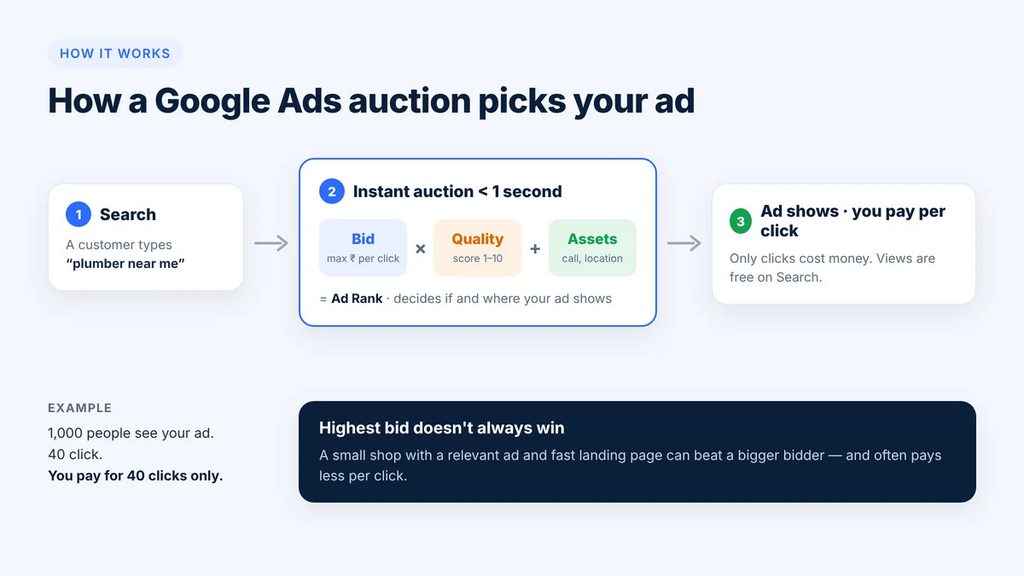
If 1,000 people see your ad and 40 click, you pay for 40 clicks. The other 960 views are free.
Some campaigns, like YouTube awareness ads, charge per 1,000 views instead. As a beginner, you can ignore those for now.
How the ad auction picks a winner
Every time someone searches, Google runs a quick auction. It takes less than a second.
Google looks at three main things:
- Your bid. The most you are willing to pay for a click.
- Your Quality Score. How useful your ad and website are for that search. Google rates this from 1 to 10.
- Expected impact of extras. Things like your phone number, location and extra links (called assets).
Here is the good part. The highest bidder does not always win. A small shop with a clear, relevant ad can beat a big brand with a weak ad. And it often pays less per click.
Keywords: the heart of Search ads
Keywords are words or phrases you choose. When someone searches something similar, your ad can show.
For example, a bakery in Jaipur might choose:
- “birthday cake delivery jaipur”
- “eggless cake near me”
- “custom cake order”
In 2026, Google uses AI to match your ads to searches with the same meaning, not just the exact words. A feature called AI Max for Search can widen this even more. That helps you find new customers. But it also means you must watch which searches trigger your ads. We cover that later.
Why Google Ads suits Indian small businesses
- You start small. There is no fixed fee and no minimum spend.
- You can stop anytime. Pause your ads in one click.
- You pay for intent. People searching “AC repair near me” want help right now.
- You can target tightly. Show ads only in your city, your pin code area, or within 5 km of your shop.
- You can advertise in local languages. Google Ads supports Hindi, Tamil, Telugu, Bengali, Marathi and many more.
- Clicks are cheaper than in the West. Indian CPCs are often 60% to 80% lower than the same keywords in the US or UK.
Is Google Ads worth it for a small business?
Yes, for most small businesses that sell something people search for. But it is not right for everyone, and it is not magic.
Google Ads works best when three things are true:
- People already search for what you sell. A plumber, a dentist or a coaching centre fits well. A brand-new product nobody knows about may struggle on Search.
- One customer is worth more than a few clicks. If a click costs ₹30 and one in 10 clickers buys, each sale costs ₹300 in ads. That works if you earn ₹1,000 profit per sale. It fails if you earn ₹100.
- You can answer leads fast. A call missed or a WhatsApp left unread is money lost.
When Google Ads is a great fit
- Local services: clinics, salons, repair shops, gyms, lawyers, CA firms, tutors
- Shops with a website or online store
- Businesses with high-value customers: real estate, interiors, solar, education
- Seasonal businesses that need quick demand: Diwali gifting, wedding services, tax season
When to wait or try something else first
- You have no website, landing page or Google Business Profile yet
- Your profit per sale is very small, like ₹20 to ₹50
- You cannot spend at least ₹10,000 to ₹15,000 for a fair one-month test
- Nobody searches for your product yet (try YouTube, Instagram or Demand Gen ads to build awareness)
A simple way to check before you spend
Use this quick maths. It takes two minutes.
- Find the average cost per click for your industry (see the cost section below).
- Guess your conversion rate. For a good landing page, 5% to 10% of clickers become leads.
- Divide CPC by conversion rate. That is your cost per lead.
- Compare it with what one lead is worth to you.
Example: A physiotherapy clinic in Pune pays ₹40 per click. One in 10 clickers books a visit. So each booking costs ₹400 in ads. The first visit earns ₹800, and many patients come back for 5 to 10 sessions. That is clearly worth it.
Google Ads vs SEO vs social media
| Channel | Speed | Cost model | Best for |
|---|---|---|---|
| Google Ads | Results in days | Pay per click | People ready to buy now |
| SEO | 3 to 12 months | Time and content effort | Long-term free traffic |
| Instagram and Facebook ads | Results in days | Pay per view or click | Building awareness and visual products |
| Google Business Profile | A few weeks | Free | Local calls and map visits |
The smartest small businesses use Google Ads for fast leads while they build SEO and their Business Profile in the background.
How much do Google Ads cost in India in 2026?
Google Ads has no fixed price in India. You decide your budget, and you pay per click. In 2026, most clicks in India cost ₹5 to ₹50 for everyday consumer businesses. Competitive fields like loans, insurance, law and B2B software can cost ₹100 to ₹600 or more per click.
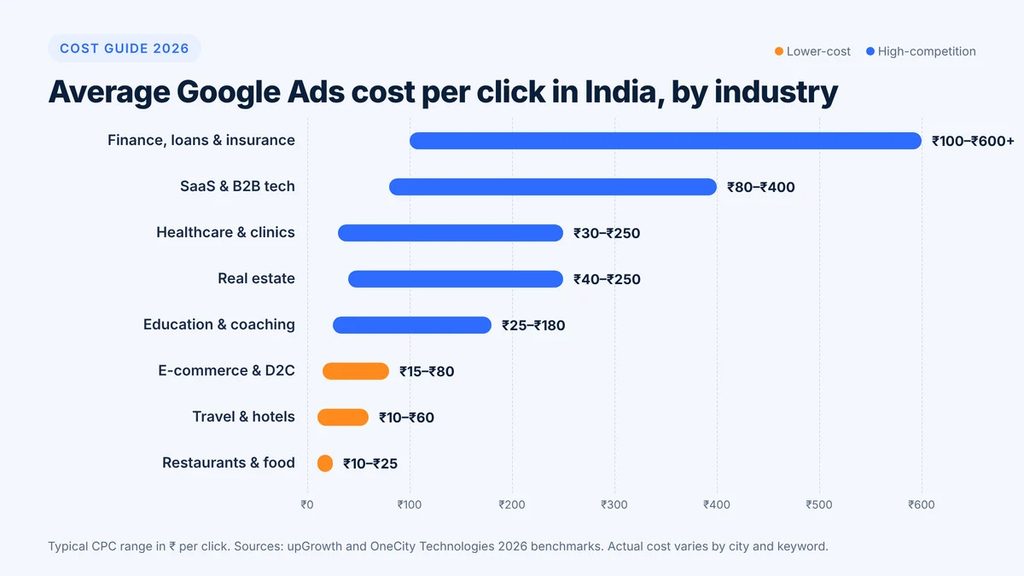
Average cost per click by industry in India (2026)
| Industry | Typical CPC range (₹) |
|---|---|
| Finance, loans and insurance | 100 to 600+ |
| SaaS and B2B technology | 80 to 400 |
| Healthcare and clinics | 30 to 250 |
| Real estate | 40 to 250 |
| Education and coaching | 25 to 180 |
| E-commerce and D2C | 15 to 80 |
| Travel and hotels | 10 to 60 |
| Restaurants and food | 10 to 25 |
These are wide ranges. A dentist in a small town may pay ₹25 per click. A dentist in South Mumbai may pay ₹150 for the same search.
What changes your cost per click
- Competition. More businesses bidding on a keyword pushes the price up.
- Location. Metro cities like Mumbai, Delhi and Bengaluru cost more than Tier 2 and Tier 3 towns.
- Quality Score. A relevant ad and a fast, clear landing page can lower your CPC a lot.
- Keyword intent. “Buy” and “near me” searches cost more because they convert better.
- Season. Prices rise during Diwali, wedding season and year-end sales.
- Device and time. Evening mobile searches can cost more in some industries.
Is there a minimum budget for Google Ads in India?
No. Google does not set a minimum budget. You could technically run ads for ₹100 a day.
But a tiny budget rarely gives useful results. Google’s AI needs data to learn who your best customers are. Several Indian agencies, suggest that below about ₹15,000 a month, the system struggles to collect enough conversions to optimise well.
Recommended starting budget for Google Ads in India
| Business type | Daily budget | Monthly budget (approx.) |
|---|---|---|
| Very small local shop, low competition | ₹300 to ₹500 | ₹9,000 to ₹15,000 |
| Local service business (clinic, salon, repair) | ₹500 to ₹1,000 | ₹15,000 to ₹30,000 |
| Online store or D2C brand | ₹1,000 to ₹2,000 | ₹30,000 to ₹60,000 |
| High-competition field (real estate, finance, B2B) | ₹2,000+ | ₹60,000+ |
Start at the lower end. Raise the budget by 15% to 20% at a time once you see steady leads.
How daily budgets really work
This surprises many beginners. Google can spend up to two times your daily budget on a busy day. On slow days it spends less.
Over a month, though, Google will not charge you more than your average daily budget multiplied by about 30.4. So a ₹500 daily budget means you will not pay more than about ₹15,200 in that month.
A simple budget formula
Use this to plan your first month:
Monthly budget = Leads you want × Cost per click ÷ Conversion rate
Example: You want 30 leads. Your CPC is about ₹40. Your landing page converts 8% of visitors.
30 × ₹40 ÷ 0.08 = ₹15,000 a month
Hidden costs to plan for
- GST. Google charges 18% GST on ad spend in India. If you are GST-registered, add your GSTIN in billing to claim input tax credit.
- Landing page. A simple, fast page may cost ₹0 (if you build it yourself) to ₹15,000 or more.
- Agency or freelancer fees. Indian agencies usually charge a flat monthly fee or 10% to 20% of ad spend.
- Your time. Plan 2 to 3 hours a week to check results if you manage ads yourself.
Google Ads credit offer in India: can you advertise for free?
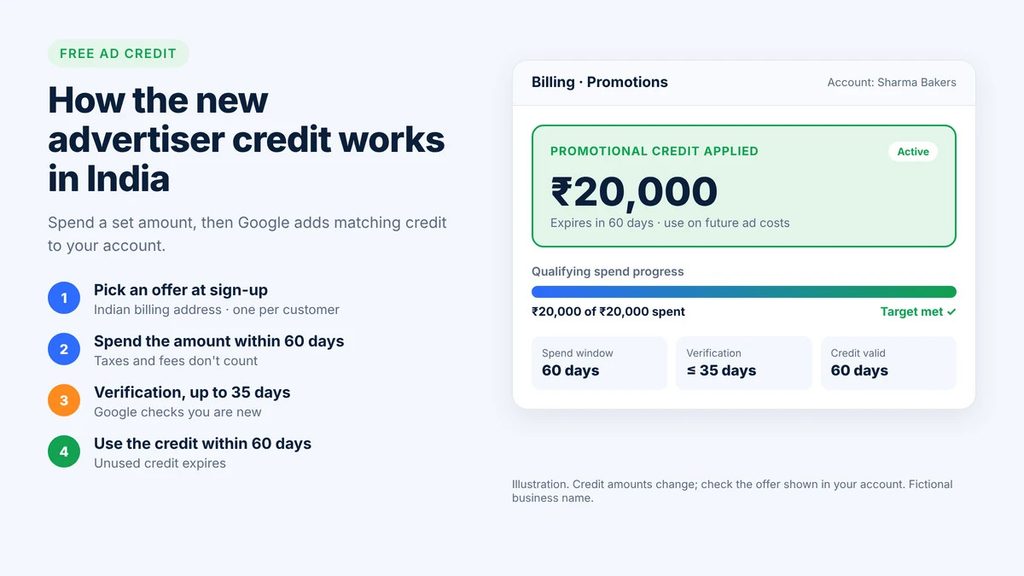
Not fully free, but you can get free ad credit. Google gives new advertisers in India a promotional credit after they spend a set amount. It is a “spend this much, get this much” deal.
How the new advertiser offer works
Google’s India sign-up page lets new advertisers choose from a few credit offers. You pick one when you sign up and add billing details. The exact amounts change from time to time and can differ by account. In recent offers, Indian advertisers have commonly seen matched tiers such as ₹20,000, ₹40,000 or ₹60,000. Always check the amount shown to you before you start.
According to Google’s help page on promotional offers, here is the general flow:
- Choose an offer at sign-up. It is applied to your new account automatically.
- Spend the required amount within 60 days. Taxes and fees do not count toward this spend.
- Wait for verification. Google checks that you are truly new. This can take up to 35 days.
- Get the credit. It appears under Billing, then Promotions.
- Use it within 60 days. Unused credit expires.
Key rules from Google’s India terms
Google’s India promotional credit terms set a few clear limits:
- Only one promotional credit per customer
- Your billing address must be in India
- For a code, your first ad must have run no more than 14 days before you enter it
- The credit cannot pay for taxes or fees
- You are charged for any spend beyond the credit, and Google does not warn you when the credit runs out
- Google can withdraw an offer at any time
Smart tips to use your Google Ads credit well
- Do not rush to hit the spend target. Spending fast on bad keywords just doubles your waste.
- Set up conversion tracking first. Then both your paid spend and your credit teach Google something useful.
- Pick a tier you would spend anyway. If your normal budget is ₹15,000 a month, the ₹20,000 tier fits naturally over 60 days.
- Note the expiry date. Set a phone reminder for the day the credit lands and the day it expires.
- Use one account only. Making many accounts to grab more credit breaks the rules and can get you suspended.
Other ways to get Google Ads credit in India
- Bank business cards. Some Indian business credit cards have bundled Google Ads credit. Check your bank’s current offers.
- Google Partner agencies. Certified partners sometimes have access to extra offers for new clients.
- Existing advertiser promotions. Google sometimes gives credit when you try a new campaign type or restart a paused account.
- Google Ad Grants. Registered non-profits may qualify for free Search ads through Google for Nonprofits. Regular businesses do not qualify.
Watch out for anyone selling “free Google Ads coupons” on social media. Real offers come from Google, your bank or a verified Google Partner.
Which Google Ads campaign type should a small business choose?
Start with a Search campaign. It is the easiest to control and reaches people who are already looking for you. Add other types once Search works.
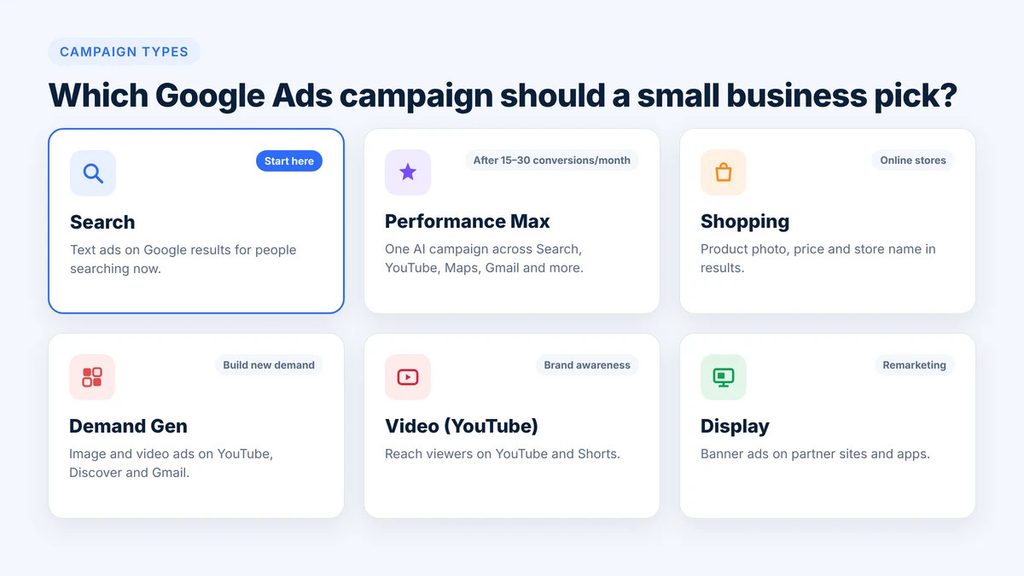
Here is what each main type does, based on Google’s campaign guide for India:
| Campaign type | Where ads show | Best for | Beginner friendly? |
|---|---|---|---|
| Search | Google Search results | Leads, calls and sales from people searching now | Yes, start here |
| Performance Max | Search, YouTube, Maps, Display, Gmail, Discover | Sales, leads and store visits from one AI campaign | After you have conversion data |
| Shopping | Product listings on Google | Online stores with a product catalogue | Yes, for e-commerce |
| Demand Gen | YouTube, Shorts, Discover, Gmail | New demand with images and videos | Medium |
| Video (YouTube) | YouTube and Shorts | Brand awareness | Medium |
| Display | Partner websites and apps | Cheap reach and remarketing | Medium |
Search campaigns: the best starting point
Search ads are text ads that appear above or below normal results. They show a headline, a short description and your link.
Why beginners should start here:
- You choose the keywords
- You see exactly which searches led to clicks
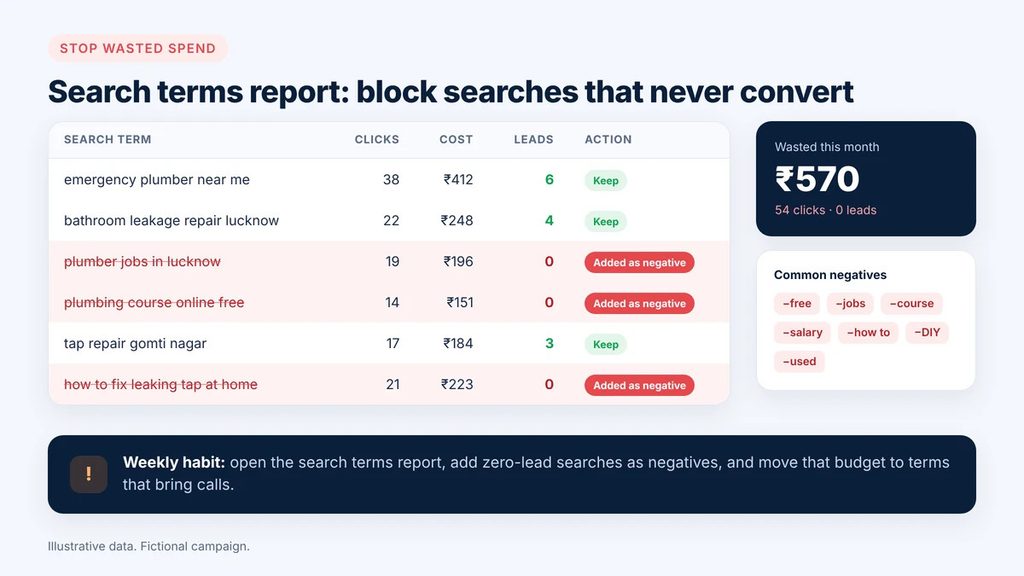
- You can block bad searches with negative keywords
- You get leads from people with clear buying intent
In 2026, Search campaigns can use AI Max. It uses AI to find extra searches and write ad text that matches them. Turn it on only after your basic campaign is working, and check the search terms report every week.
Performance Max campaigns in India
Performance Max (often called PMax) is Google’s all-in-one AI campaign. You give it your goal, budget, text, images and videos. Google then decides where to show your ads across all its channels.
Many Indian brands use it. On Google’s India Ads page, the CMO of TMRW says Performance Max is central to the company’s direct-to-consumer marketing.
Good things about Performance Max:
- One campaign covers Search, YouTube, Maps, Gmail, Discover and Display
- Strong for online stores linked to Google Merchant Center
- Can drive store visits and calls for local businesses
- Less manual work once it has learned
Watch-outs for beginners:
- It needs conversion tracking to work well
- It needs enough budget and data to learn, often a few weeks
- You get less control over exact placements
- It can spend on low-quality placements if your goals are vague
When to use Performance Max: Wait until your Search campaign brings at least 15 to 30 conversions a month. Then test PMax alongside it with a separate budget. Add good images, at least one video, and a clear list of your customers or past buyers as audience signals.
Shopping campaigns for online stores
If you sell products online, Shopping ads are a must. They show a product photo, price and store name right in search results.
You need a free Google Merchant Center account and a product feed. Platforms like Shopify, WooCommerce and Wix can connect this for you.
Demand Gen, Video and Display
These reach people who are not searching yet. They are useful for:
- New products that people do not know to search for
- Remarketing, which shows ads to people who visited your website before
- Building a brand in a new city
Keep these for later. For a small budget, intent-based Search usually gives a better return.
How to set up a Google Ads campaign in India (step by step)
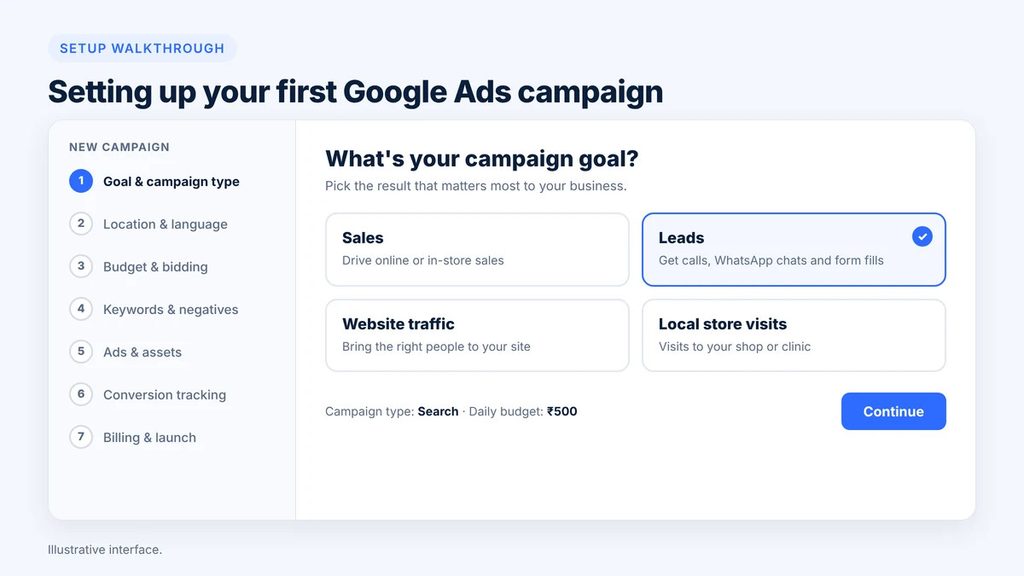
You can set up your first Search campaign in about an hour. Follow these steps in order.
Before you start: get these ready
- A Gmail or Google Workspace account
- A website or a single landing page that loads fast on mobile
- A verified Google Business Profile (for local businesses)
- Your GSTIN and PAN, if you have them, for billing and tax invoices
- A payment method: UPI, debit card, credit card or net banking
- A clear goal: calls, WhatsApp chats, form fills or online sales
Step 1: Create your Google Ads account
Go to ads.google.com and click Start now. Sign in with your business Google account.
Google may push you into “Smart” or “Express” mode. That mode is simple but gives you little control. Look for the option to switch to Expert Mode, or finish setup and then switch from the settings menu.
Step 2: Choose your goal and campaign type
Pick a goal such as Leads, Sales or Website traffic. Then choose Search as your campaign type.
Select how customers will reach you. Common choices are website visits and phone calls.
Step 3: Set your location and language
This step saves more money than any other.
- Target only the areas you serve. Choose a city, pin codes or a radius like 10 km around your shop.
- Under location options, choose Presence: people in or regularly in your targeted locations. The default setting can also show ads to people who are only interested in your area, which wastes money for local businesses.
- Add English plus the local languages your customers use, like Hindi, Marathi or Tamil.
Step 4: Set your budget and bidding
- Enter your average daily budget, for example ₹500.
- For a brand-new account, start with Maximise clicks and set a maximum CPC limit. This helps you get early data at a controlled cost.
- After you have 15 to 30 conversions, switch to Maximise conversions or Target CPA (cost per action).
Step 5: Pick your keywords
Use the free Google Keyword Planner to find what people search and what it costs.
Tips for good keywords:
- Start with 10 to 20 tightly related keywords per ad group
- Prefer buying words: “price”, “near me”, “book”, “order”, “best”, “repair”
- Add your city or area name for local services
- Use phrase match or exact match at first, so your ads show for close searches only
Step 6: Add negative keywords
Negative keywords stop your ad from showing for useless searches. Add these from day one.
Common negatives for Indian small businesses:
- free, jobs, vacancy, salary, internship
- course, training, PDF, meaning (unless you sell courses)
- second hand, used, DIY, how to make
- competitor brand names you do not want to pay for
Step 7: Write your ads
Google uses Responsive Search Ads. You write up to 15 headlines and 4 descriptions. Google mixes them to find the best combination.
A good ad includes:
- The keyword in at least two headlines
- Your city or area
- A clear offer: “Same-Day Delivery”, “Free Home Visit”, “₹199 Consultation”
- Proof: “4.8 Star Rated”, “10 Years in Jaipur”
- A call to action: “Call Now”, “Book Online”, “WhatsApp Us”
Keep headlines under 30 characters and descriptions under 90 characters.
Step 8: Add assets (extensions)
Assets make your ad bigger and more useful. They are free to add.
- Call asset: your phone number with a tap-to-call button
- Location asset: links your Google Business Profile, showing your address
- Sitelinks: extra links like Services, Prices, Reviews, Contact
- Callouts: short points like “Open Sunday” or “Cash on Delivery”
- Images and logo: your business photos
Step 9: Set up conversion tracking
Do not skip this step. Without tracking, you cannot tell which keywords bring customers.
Track the actions that matter:
- Form submissions on your website
- Calls from your ads and calls from your website
- WhatsApp button clicks
- Purchases on your online store
Use the Google tag or Google Tag Manager. Link Google Analytics too.
Step 10: Add billing and launch
Add your billing country as India, your business details and GSTIN. Choose automatic payments (pay after you get clicks) or manual payments (prepay with UPI or a card). Claim your new advertiser credit offer here if one is shown.
Your ads go into review, which usually takes less than one business day. Once approved, they go live.
Step 11: Check results in the first two weeks
- Day 2 to 3: Look at the search terms report. Add any bad searches as negatives.
- Day 7: Pause keywords that spent money with no clicks or leads.
- Day 14: Compare cost per lead across keywords. Move budget to the winners.
Resist big changes in the first week. Google needs a little time to learn.
Google Ads for local businesses in India
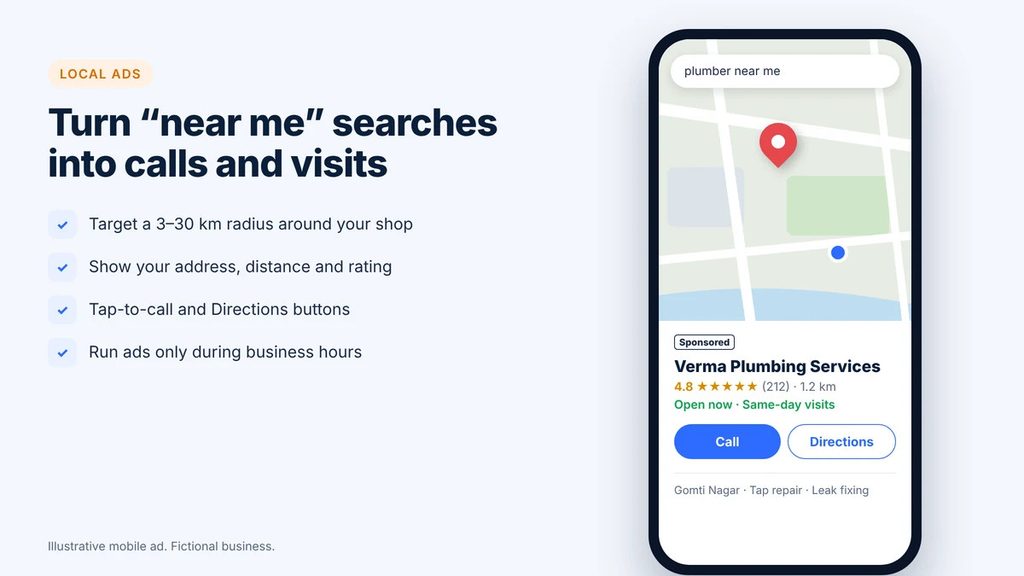
Local businesses often get the best return from Google Ads. A person searching “dentist near me” or “cake shop in Indore” usually wants to visit or call today.
Start with a strong Google Business Profile
Your Google Business Profile is free. It is the listing that shows on Google Maps with your hours, photos and reviews.
Linking it to Google Ads lets your ads show your address, distance and a Directions button. It also helps your ads appear on Google Maps.
To make it strong:
- Fill every field: category, hours, services, area served
- Add at least 10 clear photos of your shop, team and work
- Ask happy customers for reviews and reply to every review
- Post offers and updates every week
Local targeting tips that save money
- Use a radius. A salon may target 3 to 5 km. A furniture shop may target 20 to 30 km.
- Exclude areas you cannot serve. If you do not deliver across the river, exclude those pin codes.
- Run ads during working hours. If no one answers calls after 8 PM, schedule ads to stop then.
- Raise bids near your shop. You can bid more for people closer to you, because they convert better.
- Use local words. Add area names like “Koramangala”, “Andheri West” or “Sector 62 Noida” in keywords and ads.
Call ads and WhatsApp for Indian customers
Many Indian customers prefer to call or chat instead of filling a form. Use this to your advantage.
- Add a call asset so mobile users can tap to call
- Add a clear WhatsApp button on your landing page and track clicks as conversions
- Answer calls fast, ideally within three rings
- Reply to WhatsApp leads within five minutes during business hours
Example: a local plumber in Lucknow
Ravi runs a plumbing service in Lucknow. He sets a ₹400 daily budget and targets 12 km around Gomti Nagar. His keywords include “plumber near me”, “tap repair Lucknow” and “bathroom leakage repair”.
He adds negatives like “jobs” and “course”. His ads run from 8 AM to 8 PM with a call button.
In a month he spends about ₹12,000 and gets around 45 calls. About 25 become paid jobs at an average of ₹1,200 each. That is roughly ₹30,000 in revenue from ₹12,000 in ads, plus repeat customers later.
These numbers are an illustration, not a promise. Your results will depend on your city, prices and how fast you respond.
Common Google Ads mistakes small businesses in India make
Most wasted ad money comes from a handful of avoidable mistakes. Fix these and your budget goes much further.
- Staying in Smart mode forever. It hides search terms and limits control. Switch to Expert Mode.
- Targeting all of India. A shop in Nagpur does not need clicks from Kolkata. Target only where you sell.
- Using broad match with no negatives. Your “shoe repair” ad may show for “shoe repair jobs” or “how to repair shoes at home”.
- No conversion tracking. You end up judging ads by clicks, not customers.
- Sending traffic to the home page. Send each ad to the most relevant page, like a page just for “AC repair”.
- A slow mobile website. Most Indian searches happen on phones. If your page takes more than 3 seconds to load, many people leave.
- Leaving the Display Network on in Search campaigns. This option adds cheap but low-quality clicks. Untick it for a beginner Search campaign.
- Accepting every Google recommendation. Some help. Some just raise your spend. Read each one before you apply it.
- Changing too much, too soon. Give a campaign at least 2 weeks before big changes.
- Not answering leads. The best ad in the world fails if no one picks up the phone.
Tips to get better results on a small budget
- Focus on one service first. Put your full budget behind your best-selling service instead of spreading it thin.
- Write the offer into the ad. “Free inspection” or “Flat ₹500 off” lifts click rates.
- Show prices if they are competitive. This filters out bargain hunters and attracts serious buyers.
- Use ad scheduling. Show ads when you can answer calls.
- Test two landing pages. Small changes in headline or form length can double leads.
- Use remarketing later. Once your site gets traffic, show ads to past visitors who did not buy.
- Review the search terms report weekly. It is the single most useful report for saving money.
How to measure if your Google Ads are working
Clicks feel good, but they do not pay bills. Track these numbers each week:
| Metric | What it means | What to aim for |
|---|---|---|
| Click-through rate (CTR) | Percent of viewers who click your ad | 4% to 7% on Search in India is healthy |
| Cost per click (CPC) | Average price of one click | At or below your industry range |
| Conversion rate | Percent of clickers who call, chat or buy | 5% to 10% for a good landing page |
| Cost per lead (CPL) | Ad spend divided by leads | Well below the profit from one customer |
| Return on ad spend (ROAS) | Revenue divided by ad spend | Above 3x is a common target for online stores |
Keep a simple sheet. Write down weekly spend, leads, sales and revenue. After a month, you will know exactly what one customer costs you.
Should you hire an agency or do it yourself?
Do it yourself if your budget is under ₹20,000 a month, you have a few hours a week, and you like learning.
Hire help if you spend more than ₹30,000 a month, run several campaigns, or have no time. Look for a verified Google Partner and ask for:
- Full admin access to your own Google Ads account
- Monthly reports showing leads and cost per lead, not just clicks
- No long lock-in contracts
Never let an agency own your ad account. Your data and history belong to you.
Frequently asked questions
How much does Google Ads cost for a small business in India?
Most small businesses in India spend ₹10,000 to ₹50,000 a month on Google Ads. Clicks usually cost ₹5 to ₹150, depending on industry and city. You set the budget, so you never pay more than you choose.
What is the minimum budget for Google Ads in India?
There is no minimum budget. You can start with ₹100 a day. For useful results, most small businesses should plan ₹300 to ₹1,000 a day, or about ₹10,000 to ₹30,000 a month.
Can I run Google Ads for free in India?
Not completely. But new advertisers can earn free promotional credit by spending a matching amount within 60 days. Google’s free tools, like Google Business Profile and Keyword Planner, also help you get found at no cost.
How do I get the Google Ads ₹20,000 credit in India?
Create a new Google Ads account with an Indian billing address. Choose the credit offer shown at sign-up, then spend the required amount within 60 days. Google adds the credit within about 35 days, and you must use it within 60 days.
Is Google Ads worth it for a small business?
Yes, if people search for what you sell and one customer earns you more than the cost of getting them. Local services, clinics, coaching centres and online stores often see good returns. Track leads, not just clicks, to know for sure.
How long does it take for Google Ads to work?
Ads can bring clicks within hours of approval. Most campaigns need 2 to 4 weeks to settle and 1 to 3 months to reach a steady cost per lead.
Which is better for a small business, Google Ads or Facebook Ads?
Google Ads is better when people actively search for your product or service. Facebook and Instagram ads are better for building awareness and selling visual products. Many businesses use both.
What is Performance Max in Google Ads?
Performance Max is an AI-driven campaign that shows your ads across Search, YouTube, Maps, Gmail, Discover and Display from one setup. It works best once you have conversion tracking and some past results.
Can I pay for Google Ads with UPI in India?
Yes. Google Ads in India accepts UPI, debit cards, credit cards and net banking. Manual prepayment with UPI is popular with small businesses that want tight control.
Do I need a website to run Google Ads?
Not always. Call-only ads and Performance Max with a store goal can work with a Google Business Profile. But a simple, fast landing page almost always gets better results.
Does Google charge GST on ads in India?
Yes. Google charges 18% GST on Google Ads spend in India. Registered businesses can add their GSTIN to get a proper tax invoice and claim input tax credit.
Can I target customers in my city only?
Yes. You can target a city, specific pin codes, or a radius around your shop. You can also exclude areas you do not serve.
Final thoughts
Google Ads for small business in India is one of the fastest ways to reach customers who are ready to buy. You control the budget, you can start small, and you can stop at any time.
Start with one Search campaign, one service and one city. Track every call and form. Claim the new advertiser credit if it fits your budget. Then grow slowly, using real numbers, not guesses.