
Quick answer: what is Google Business Profile optimization?
Google Business Profile optimization is the work of filling in, verifying and updating your free Google listing so it shows up higher on Google Search and Google Maps. To optimize it in 2026, verify your business, pick the most exact primary category, keep your name, address and phone the same everywhere, add real photos, collect and reply to reviews, post updates every week, and add services, hours and a WhatsApp or call button. Done well, it brings more calls, direction requests and walk-ins from people searching "near me".
Why this guide is different
Most guides on Google Business Profile optimization are written for American shops. India is not America. Here, customers search in Hindi and English mixed together. They use WhatsApp more than email. Addresses often depend on landmarks, not street numbers. Festival hours change every few weeks. And competition in cities like Delhi, Mumbai, Bengaluru and Ghaziabad is fierce.
This guide is built for that reality. It covers every step, from creating your profile to ranking in the local pack, plus the changes Google made in 2025 and 2026. These include the end of the public Q&A section, new AI answers on Maps, stricter review rules and more video verification. Whether you run a clinic, a coaching centre, a restaurant, a salon or a service business, you can follow each step yourself.
You may know this tool by its old name, Google My Business (GMB). Google renamed it Google Business Profile (GBP). The goal of Google My Business optimization is the same: get found, get trusted and get chosen.
What you will learn
- What Google Business Profile is and why it matters for Indian businesses
- How Google decides which businesses rank on Maps
- How to create and verify your profile in India
- A field-by-field optimization guide
- How to get more reviews the right way
- How to use posts, photos and WhatsApp
- How to show up in AI Overviews and AI answer engines
- Common mistakes that get profiles suspended
- How to track results
- A full 2026 checklist and FAQs
What Is Google Business Profile?
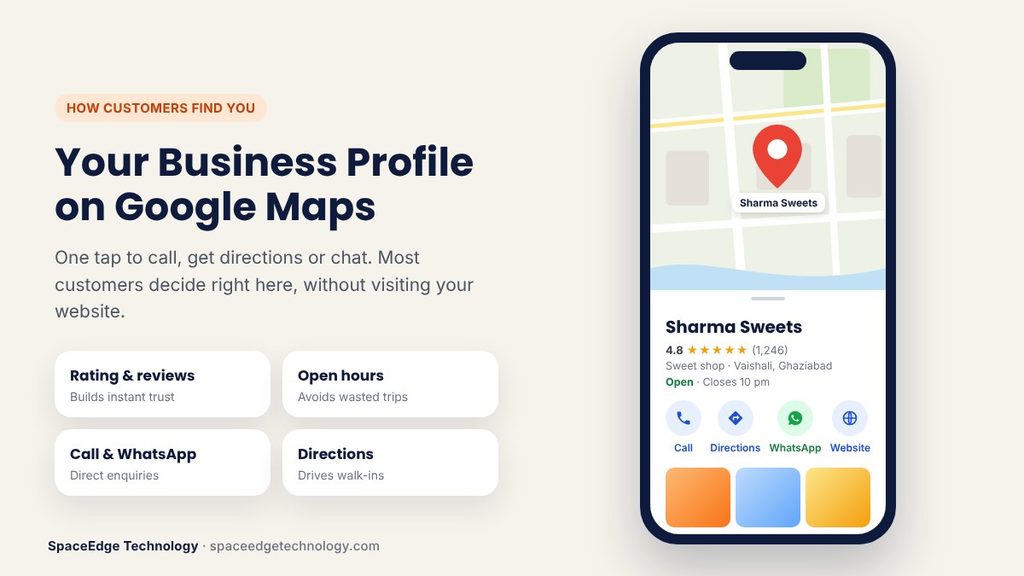
Google Business Profile is a free listing that shows your business on Google Search and Google Maps. It holds your name, address, phone number, hours, photos, reviews and website link. When someone searches "dentist near me" or "best sweet shop in Vaishali", Google shows a map with three businesses at the top. That box is called the local pack. Your profile is what gets you into it.
You do not need a website to have a profile. You do not need to pay. You only need a Google account and a real business that meets customers in person, either at your shop or at their place.
Google My Business vs Google Business Profile
They are the same thing. Google My Business was the old name. Google changed it to Google Business Profile in 2021 and later moved most editing into Google Search and Maps itself. Today you can edit your profile by searching your business name on Google while logged in, or through the Google Maps app.
Why Google Business Profile Optimization Matters for Indian Businesses in 2026
India is a mobile-first country. Most local searches happen on a phone, often while the person is already on the road. They want an answer now. They tap "Call", "Directions" or "WhatsApp" straight from your profile. Many never visit your website at all.
That means your profile is often your first impression. A blank or wrong profile loses the customer before you even know they existed. An optimized one wins the call.
Here is what a strong profile does for you:
- Brings ready-to-buy customers. People searching "near me" usually want to buy today.
- Builds trust fast. Reviews and real photos answer the question "Is this place good?"
- Costs nothing. Unlike ads, the listing itself is free.
- Feeds AI search. Google's AI Overviews, AI Mode and Ask Maps answers lean on profile data, reviews and your website. Tools like ChatGPT and Perplexity also read public business data.
- Beats bigger brands locally. A small shop with a complete, active profile can outrank a big chain on Maps.
Your profile works best alongside a full local SEO services plan, but even on its own it can change how many calls you get.
How Google Ranks Businesses on Google Maps
Google says local results depend on three main things. Understanding them makes every step below make sense.
- Relevance. How well your profile matches what the person searched. Your category, services, description and reviews tell Google what you do.
- Distance. How far your business is from the searcher, or from the area named in the search. You cannot change this, but you can make sure your pin and address are correct.
- Prominence. How well known and trusted your business is. Reviews, ratings, photos, mentions on other websites and your website's own strength all count.
In 2026, many local SEO experts also see activity matter more. Profiles that get regular new photos, posts and review replies tend to hold their place better than profiles left alone for months. Google has not published a fixed rule, but it does tell owners to keep info current and respond to customers. Treat your profile as a living page, not a one-time setup.
How to Create a Google Business Profile in India (Step by Step)
If you already have a profile, skip to verification. If not, follow these steps. It takes about 15 minutes.
- Go to google.com/business and sign in with a Google account. Use an account you will keep for years, ideally one owned by the business, not a staff member.
- Search for your business name. If it already exists, claim it. If not, choose "Add your business to Google".
- Type your business name exactly as it appears on your signboard. Do not add city names or keywords.
- Pick your primary category. More on this below, because it is the most important choice you make.
- Choose whether customers visit your location. Shops, clinics and restaurants say yes. Home-service businesses like AC repair or pest control can hide the address and add a service area instead.
- Enter your full address with PIN code. Add a landmark if it helps, for example "Near Metro Pillar 112".
- Drag the map pin to your exact door. A wrong pin sends customers to the wrong place and confuses Google.
- Add your phone number and website.
- Start verification.
Setting up a service area business in India
Many Indian businesses work at the customer's home or office. Think electricians, home tutors, packers and movers, beauticians on call and RO repair. If you do not serve customers at your own address, hide it. Then add the areas you serve, such as cities, districts or PIN codes. Keep the list realistic. Claiming the whole of India when you only serve one city can hurt you and may lead to suspension.
How to Verify Your Google Business Profile in India
Verification proves you own the business. Until you verify, your profile may not show to the public, and you cannot use most features. Verification is always free. Anyone who asks you to pay for it is not Google.
Google decides which method you get. It depends on your category, location and account history. The options you may see are:
| Method | How it works | Typical time |
|---|---|---|
| Video recording | Record one unedited video of your business on your phone | Review often takes up to about 5 business days |
| Live video call | Show your business to a Google support person live | Same call, once booked |
| Phone call or SMS | Get a code by call or text | Minutes |
| Get a code by email | Minutes | |
| Postcard | A code is posted to your address | Around 5 to 14 days |
| Instant | Possible if your website is already verified in Search Console | Instant |
Google Business Profile video verification tips
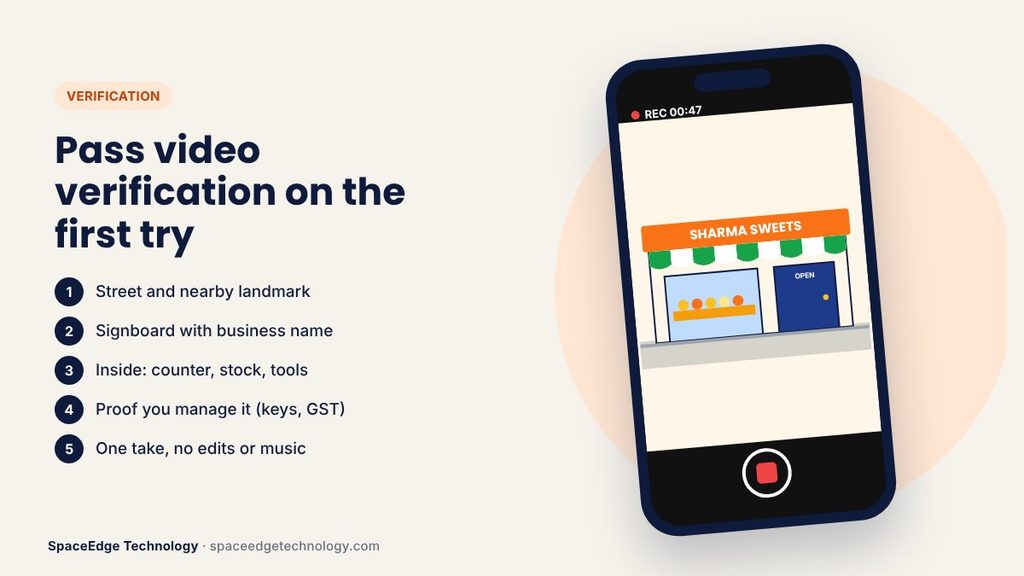
Video is now the most common method for new profiles. Many owners fail on the first try because they miss one detail. Follow these tips:
- Record in one take. Do not edit, cut or add music. Most guides say aim for at least 30 seconds; one to two minutes is safer.
- Start outside. Show the street, a nearby landmark and your signboard with the business name.
- Walk inside. Show your counter, products, tools or equipment that prove you run this business.
- Prove you are in charge. Unlock the shop shutter, open the cash counter, or show a staff-only room, a business document or your GST certificate.
- Match your profile. The name on the signboard and the address must match what you typed. A mismatch is the top reason for rejection.
- Use good light and a steady hand. Daylight works best.
- Do not change your profile during verification. Finish verifying first. Optimize after.
Service area businesses with no shop should show a branded vehicle, uniform, tools and business papers instead.
Field-by-Field Google Business Profile Optimization
Once verified, fill in every field. Empty fields leave Google guessing. Here is how to handle each one.
Business name
Use your real-world name only. If your board says "Sharma Sweets", your profile says "Sharma Sweets". Not "Sharma Sweets Best Mithai Shop Ghaziabad". Adding keywords to your name breaks Google's rules and is one of the fastest ways to get suspended. It might give a short boost, but the risk is not worth it.
Primary and secondary categories
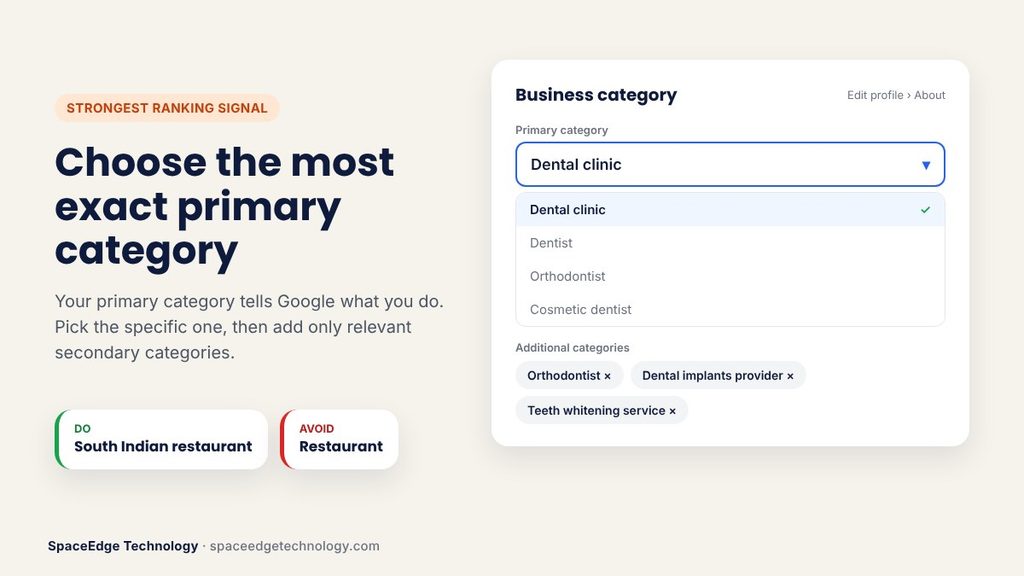
Your primary category is the single strongest signal of what you do. Pick the most exact one. "Dental clinic" beats "Clinic". "South Indian restaurant" beats "Restaurant". "IELTS coaching center" beats "Education center" if that option fits your business.
You can add up to nine more categories. Only add ones that match what you actually offer. A restaurant that also does catering can add "Caterer". Do not add unrelated categories just to show up in more searches.
How to find the best category for Google Business Profile: search your main keyword on Google Maps, open the top three competitors, and note the category shown under their name. Then pick the one that best fits you.
Business description
You get 750 characters. Use the first 250 well, because that is what most people see. Say what you do, who you serve, where you are and what makes you different. Add your main service words naturally. Do not paste links or put phone numbers in the description.
Example for a clinic: "Smile Care Dental Clinic in Vaishali, Ghaziabad offers painless root canal, braces, implants and teeth cleaning. Dr. Neha Gupta has treated families here since 2012. Open Monday to Saturday with evening slots for working patients."
Phone number
Use a number that someone always answers. A missed call is a lost customer. Many Indian businesses use a virtual number or a toll-free number so calls can reach several staff phones. Whatever you choose, keep the same main number on your website, social pages and directories.
Website link
Link to your homepage or the exact location page. Make sure the page loads fast on mobile and shows the same name, address and phone. If your site is slow or old, a mobile-friendly website will turn more profile clicks into enquiries.
Hours and special hours
Add regular hours. Then add special hours for every holiday. In India, that means Diwali, Holi, Eid, Christmas, Independence Day, Republic Day and local festivals. Nothing angers a customer more than driving to a shop marked "Open" and finding the shutter down. Google also sends reminders before big holidays. Act on them.
Services and products
List every service with a short description. If you sell products, add them with photos and prices or price ranges. This helps your profile show for exact searches like "root canal treatment cost" or "wedding cake order". Note that Google sometimes adds suggested services on its own. Check your list and remove anything you do not offer.
Attributes
Attributes are small tags like "Wheelchair accessible", "Women-owned", "Free Wi-Fi", "Online appointments" or payment options. Pick every one that is true. These help Google answer detailed questions from searchers and AI tools.
Opening date, booking and menu links
Add your opening year. If you take bookings, add an appointment link. Restaurants should add a menu. Google can now read a menu photo or PDF and build a menu for you, but check the result carefully for wrong prices or names.
Photos and Videos: Show Customers What to Expect
People trust what they can see. Profiles with many real photos usually get more calls and direction requests than profiles with few or none. Google itself tells owners that photos help customers decide.
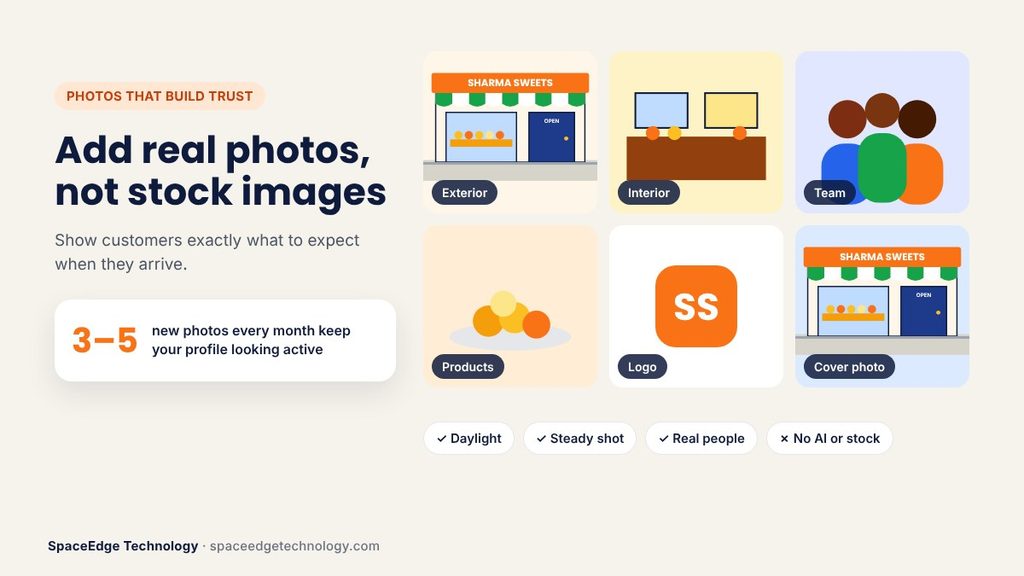
Add these photos first:
- Logo. A clear, square version. If your logo looks dated, fresh logo design helps your profile look professional.
- Cover photo. Your best shot. Usually your storefront or main work area.
- Exterior. Shots from the road so people can spot you. Take them at different times of day.
- Interior. Your counter, seating, waiting area or workshop.
- Team. Real staff at work. Customers like to see who will serve them.
- Products or work. Before-and-after shots, finished jobs, popular dishes.
- Short videos. A 15 to 30 second walk-through or a quick demo.
A few photo rules:
- Use real photos, not stock images or AI-made pictures. Fake images can lead to suspension.
- Shoot in daylight and keep the camera steady.
- Add three to five new photos every month. Fresh photos tell Google the business is active.
- Name your image files clearly before upload, for example "sharma-sweets-vaishali-storefront.jpg".
How to Get More Google Reviews (the Right Way)
Reviews are one of the strongest local ranking signals. They also decide whether a searcher calls you or your competitor. Both the number of reviews and how recent they are matter. So does what customers write. A review that says "Got my AC gas refilled in Indirapuram within two hours" tells Google exactly what you do and where.
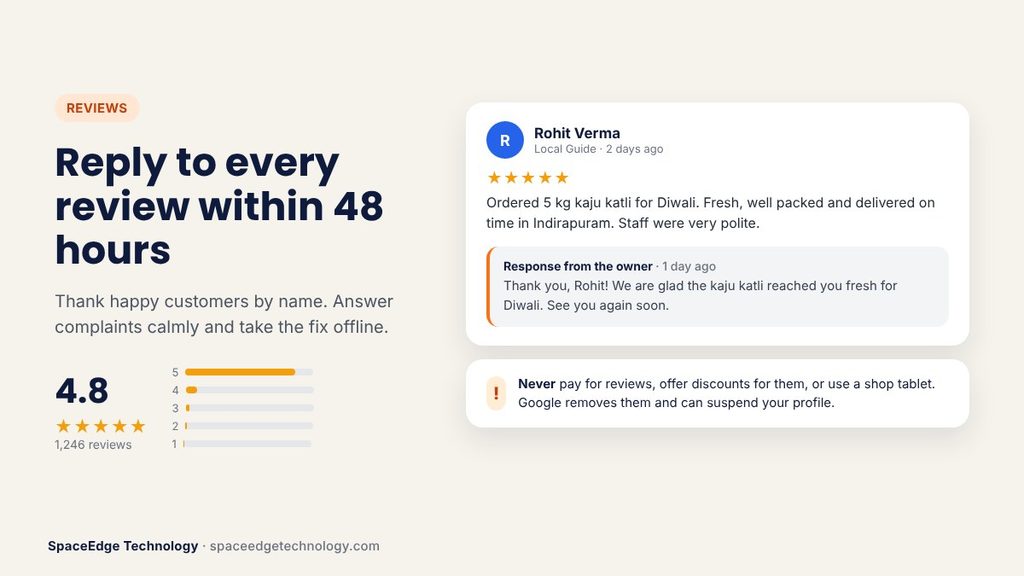
Simple ways to ask for reviews
- Get your review link. Open your profile, find "Ask for reviews" and copy the short link. You can also print the QR code.
- Ask at the right moment. Right after a happy customer says thank you is the best time.
- Send the link on WhatsApp. In India, a polite WhatsApp message gets far more replies than email. Use WhatsApp marketing tools to send it after each sale or visit.
- Use SMS and email too. A short bulk SMS or a follow-up in your bulk email campaigns can reach customers who are not on WhatsApp. Follow DLT rules for SMS in India.
- Put the QR code at your counter. A small standee near the billing desk works well. Customers scan it on their own phone.
- Make it easy. Tell them it takes one minute. Ask them to mention the service they used.
What Google does not allow
Google's review rules are strict and enforcement got tougher in 2026. Avoid these, or you risk removed reviews, a warning on your profile or suspension:
- Paying for reviews or giving discounts, gifts or freebies in return.
- Asking only happy customers for reviews while filtering out unhappy ones (called review gating).
- Writing reviews for yourself or asking staff, friends or family to do it.
- Using a shop tablet or kiosk where customers post reviews on your device.
- Buying reviews from "review sellers" on social media.
- Setting review quotas for staff or pushing customers to name a staff member in the review.
A slow, steady flow of genuine reviews beats a sudden burst every time. A jump from 10 to 200 reviews in a week looks fake to Google.
How to reply to Google reviews
Reply to every review, good or bad, ideally within two days.
- Positive review: Thank them by name and mention the service. "Thank you, Rohit. Glad your laptop screen repair went smoothly. See you again."
- Negative review: Stay calm. Apologise for the experience, do not argue in public and give a way to fix it offline. "Sorry about the wait, Priya. This is not our standard. Please call us on our main number so we can make it right."
- Fake review: Do not attack the reviewer. Report it from your profile and reply politely that you have no record of the customer.
Google may hold replies for a short check before they appear, so give it time. Reply in the language the customer used. A Hindi review deserves a Hindi reply.
Google Business Profile Posts: Keep Your Profile Fresh
Posts are short updates that appear on your profile. Think of them as free mini-ads. They do not stay on top forever, so post regularly. Once a week is a good target for most small businesses. Google now also lets you schedule posts ahead of time.
Google Business Profile post ideas for Indian businesses
- Offers: "Flat 20% off on facials this Navratri."
- Events: "Free eye check-up camp on Sunday, 10 am to 2 pm."
- New products: "New winter collection now in store."
- Tips: "Three signs your RO filter needs changing."
- Behind the scenes: A photo of your team preparing for the festive rush.
- Customer stories: A happy customer photo, with their permission.
Keep posts short. Use one real photo, a clear message and a button like "Call now" or "Learn more". Do not stuff keywords. If you are stuck for ideas, our guide on ChatGPT for SEO prompts shows how to brainstorm faster. Sharing the same update on Instagram and Facebook as part of your social media optimization keeps your message the same everywhere.
Add WhatsApp to Google Business Profile
Indian customers love WhatsApp. Google now lets verified businesses add a chat button that opens WhatsApp or text messages. Google's old built-in chat feature ended in July 2024, so this is the way to let people message you from your listing.
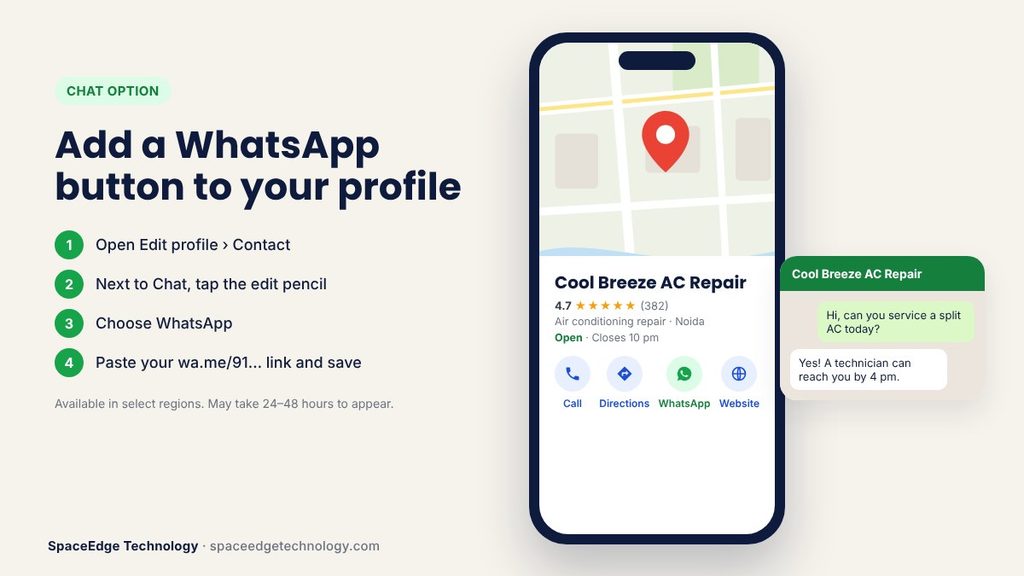
To add it:
- Open your Business Profile and select Edit profile, then Contact.
- Next to Chat, select the edit pencil.
- Choose WhatsApp and paste your click-to-chat link, which looks like wa.me/91XXXXXXXXXX.
- Save. The button may take up to a day or two to appear.
Google says chat options are only available in some regions, so you may not see it right away. If you add both WhatsApp and text, only the text option shows. If you get many chats, a WhatsApp Business API setup with auto-replies and a shared team inbox helps you answer within minutes, even after hours.
The End of Google Q&A and the Rise of AI Answers
For years, profiles had a public Questions and Answers section. Google has been phasing it out since late 2025. New profiles no longer get it. In its place, Google is using AI to answer customer questions about a place, drawing on your profile details, reviews, photos and website.
This means AI now speaks for your business. If your profile is thin, the AI may guess, or recommend someone else. Here is what to do:
- Move your old Q&A to your website. Create a clear FAQ page and add FAQ schema.
- Fill every profile field. Services, attributes, hours and description give the AI facts to use.
- Encourage detailed reviews. Reviews that mention services, parking, wait times and prices answer real questions.
How to Show Your Business in Google AI Overviews and AI Answer Engines
More people now ask Google's AI Mode, ChatGPT, Gemini or Perplexity questions like "Which is the best physiotherapy clinic in Noida?" These tools gather facts from Google profiles, reviews, websites and directories. To get mentioned:
- Keep your name, address and phone (NAP) the same everywhere. Your website, Justdial, Sulekha, IndiaMART, Facebook, Instagram and other listings should match your Google profile exactly.
- Get listed on trusted Indian directories. These citations help Google and AI tools confirm you are real.
- Write clear service pages on your website. One page per main service, with the city name, prices if possible and FAQs.
- Earn local mentions. Local news, chamber of commerce pages, college or event sponsorships and supplier pages all build trust.
- Answer questions in plain words. AI tools favour short, direct answers. Use the same simple style on your site.
- Add LocalBusiness schema to your website with your name, address, phone, hours and map link.
Common Google Business Profile Mistakes That Hurt Rankings
Suspensions became more common in 2026. Many are caused by simple mistakes. Avoid these:
- Keyword stuffing the business name. Use your real name only.
- Using a virtual office or co-working desk you do not staff. Google needs a real place where you serve customers, or a hidden address for service businesses.
- Creating duplicate profiles. One location gets one profile. If you find a duplicate, report it on Maps under "Suggest an edit".
- Wrong map pin or address. Check the pin on both desktop and mobile.
- Changing many details at once. Big edits to name, address and category together can trigger re-verification. Change one thing at a time.
- Ignoring edits from Google or users. Anyone can suggest changes to your hours or category. Check your profile weekly and turn on email alerts.
- Using stock or AI images. Use real photos.
- Leaving the profile idle. No posts, photos or replies for months makes your listing look closed.
- Using a staff member's personal Gmail as the only owner. When they leave, you can lose access. Always keep the business owner as primary owner and add staff as managers.
- Paying "experts" who promise instant rank one. No one can guarantee it. Shortcuts like fake reviews usually end in suspension.
If your profile is suspended, do not make a new one. File a reinstatement request through Google's official form with proof such as a shop licence, GST certificate, electricity bill or rent agreement that shows the same name and address.
How to Track Your Google Business Profile Results
You cannot improve what you do not measure. Open your profile and select Performance. You will see:
- Searches: the words people typed before finding you.
- Views: how many people saw your profile on Search and Maps.
- Calls: taps on your call button.
- Directions: how many asked for the route to your shop.
- Website clicks: visits from your profile to your site.
- Messages and bookings, if you use them.
Check these numbers once a month. Look at the search terms list to find new service words to add to your profile, posts and website. Add UTM tags to your website link (for example ?utm_source=google&utm_medium=organic&utm_campaign=gbp) so Google Analytics shows how many visitors and leads came from your profile.
Want faster results while your organic ranking grows? Running local Google Ads (PPC) campaigns linked to your profile can put you at the top of Maps for key searches today.
Google Business Profile Optimization Checklist 2026
Use this checklist to review your profile. Tick each item once it is done.
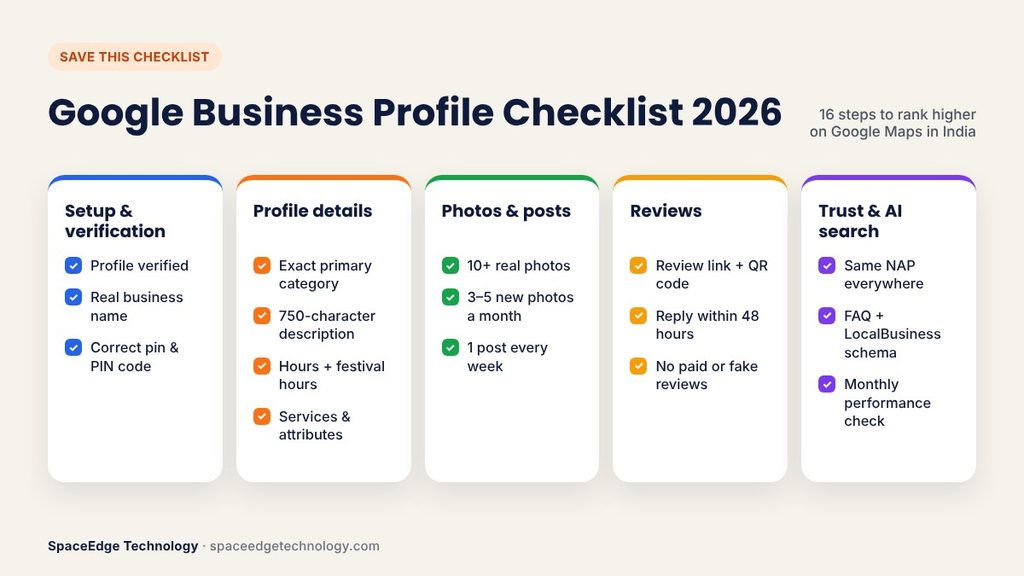
Setup and verification
- Profile claimed and verified with an owner account the business controls
- Business name matches the signboard exactly, with no extra keywords
- Address, PIN code and map pin are correct (or address hidden with service areas for home-service businesses)
- Main phone number answered during all open hours
Profile details
- Most exact primary category chosen, plus only relevant secondary categories
- 750-character description written in plain words, with main services and area
- Regular hours and festival special hours added
- All services and products listed with short descriptions
- All true attributes selected
- Website, booking and menu links added, with UTM tags
- WhatsApp chat button added (if available)
Photos and content
- Logo and cover photo uploaded
- At least 10 real photos: exterior, interior, team, work
- Three to five new photos added every month
- One post published every week
Reviews
- Review link and QR code ready
- Review request sent after every sale by WhatsApp or SMS
- Every review replied to within two days
- No incentives, gating or staff-written reviews
Trust and AI readiness
- Same name, address and phone on website and directories
- Website FAQ page with FAQ schema
- LocalBusiness schema added to the website
- Email alerts on for profile edits
- Performance report checked monthly
Frequently Asked Questions About Google Business Profile Optimization
Is Google Business Profile free in India?
Yes. Creating, verifying and managing a Google Business Profile is completely free. Google never charges for verification. You only pay if you choose to run Google Ads or hire an agency to manage it for you.
How do I get my business on top of Google Maps?
Verify your profile, choose the most exact primary category, fill every field, add real photos, get steady genuine reviews and reply to all of them, and post weekly. Keep your name, address and phone the same across the web. Distance from the searcher also matters, so no one can rank first for every search everywhere.
How long does Google Business Profile optimization take to show results?
Small gains, like more views, can appear within a few weeks of completing your profile. Stronger ranking changes usually take two to six months, depending on how competitive your category and city are. Consistency matters more than speed.
How do I verify my Google Business Profile in India?
Open your profile and select "Get verified". Google will offer one or more methods, such as a video recording, live video call, phone, SMS, email or postcard. Video is now the most common. Record one unedited clip showing your signboard, surroundings, inside of the business and proof that you manage it.
Why is my Google Business Profile not showing on Maps?
The most common reasons are that the profile is not yet verified, it is suspended, the map pin is wrong, there is a duplicate listing, or you are searching from too far away. A very general category can also hide you from specific searches. Check your dashboard for warnings first.
Can I have a Google Business Profile without a shop?
Yes. Service area businesses like plumbers, tutors and home cleaners can create a profile, hide their address and list the areas they serve. You still need a real address for verification, but customers will not see it.
How many Google reviews do I need to rank?
There is no fixed number. What matters is having more recent, genuine, detailed reviews than your nearby competitors, with a good average rating. Check how many reviews the top three businesses in your area have and aim to steadily pass them.
Can I delete bad Google reviews?
No, a business cannot delete reviews. You can report a review that breaks Google's rules, such as spam, hate speech or a fake review from someone who was never a customer. For honest negative reviews, reply politely and fix the problem. A good reply can win trust from future customers.
Should I add keywords to my business name?
No. Adding keywords or city names that are not part of your real business name breaks Google's guidelines. It is one of the most common reasons for suspension in 2026.
How often should I post on Google Business Profile?
Once a week is a good habit for most businesses. Busy businesses like restaurants and retail stores can post two or three times a week during festivals and sales.
What replaced Questions and Answers on Google Business Profile?
Google has been phasing out the public Q&A section since late 2025. AI-generated answers now respond to customer questions using your profile details, reviews, photos and website. Keep your profile complete and add an FAQ page to your website so the AI has accurate facts.
Can I manage multiple locations in one Google account?
Yes. Each location needs its own verified profile, but you can manage all of them from one account. Multi-location businesses can also use bulk verification and now schedule posts across locations.
Final Thoughts
Google Business Profile optimization is not a one-time task. It is a weekly habit. Verify your profile, fill every field honestly, keep photos fresh, earn real reviews and reply to every one. Add WhatsApp so customers can reach you the way they prefer. Then track your numbers and keep improving.
Indian businesses that treat their profile like a shopfront on Google will win more calls, walk-ins and trust in 2026. Those who set it and forget it will slowly disappear from the map, and from AI answers too.
If you want expert help, SpaceEdge Technology has been helping Indian businesses grow online since 2008. Our team handles profile setup, verification, reviews, posts and full local SEO services. Read more guides on our blog, or contact our team for a free Google Business Profile audit.
Want results like this for your business?
Book a free marketing audit and see exactly where your growth opportunities are.
Get Free Audit →