
Quick answer: To get your business recommended by ChatGPT, Claude, Gemini and Perplexity, make sure AI crawlers can read your website, get your pages indexed on Google, Bing and Brave, keep your business name, address and details the same everywhere online, collect detailed customer reviews, publish clear pages that answer real customer questions with facts and numbers, and get mentioned on trusted third-party websites. AI tools recommend the businesses they can find, understand and trust. This practice is called Generative Engine Optimization (GEO).
Key Takeaways
- AI assistants do not rank ten blue links. They pick a few names and explain why.
- Each tool searches a different index. ChatGPT leans on Bing, Gemini on Google, Claude on Brave Search, and Perplexity on its own crawler plus other sources.
- If an AI crawler cannot read your site, you cannot be recommended. Check your robots.txt and firewall first.
- AI trusts what other people say about you more than what you say about yourself. Reviews, listings and mentions on other sites matter a lot.
- Clear, fact-rich pages that answer one question at a time are the easiest for AI to quote.
- You can test your visibility for free by asking the AI tools the same questions your customers ask.
What Does It Mean to Be "Recommended" by AI?
Think about how people used to find a business. They typed "best dentist near me" into Google. They saw a list of ten links. They clicked a few and decided.
Now many people ask an AI assistant instead. They type or say something like, "Which dentist in my area is good for kids and open on Saturdays?" The AI does not show ten links. It gives a short answer with two or three names and a reason for each.
Being "recommended" means your business is one of those names.
This is different from ranking on Google in one big way. On Google, position five still gets some clicks. In an AI answer, there may be no position five. You are either in the answer or you are not.
That is why business owners are paying attention. The space is small. The rewards are big.
Why AI Recommendations Matter for Your Business in 2026
You might think AI search is still a niche habit. The numbers say otherwise.
- ChatGPT has around 900 million weekly users. OpenAI reported this figure in February 2026, more than double the 400 million it reported a year earlier.
- Google AI Mode passed 1 billion monthly users. Google shared this at its I/O 2026 event. Google's AI Overviews, the AI summaries at the top of normal search results, reach roughly 2 billion people a month.
- Nearly half of consumers now use AI to find local businesses. BrightLocal's 2026 Local Consumer Review Survey found that 45% of consumers used AI tools like ChatGPT, Gemini and Perplexity to find local businesses in the past year. A year earlier, that number was just 6%.
- Very few businesses get recommended. A 2026 SOCi Local Visibility Index study of more than 350,000 business locations found that ChatGPT recommended only about 1.2% of local businesses.
Put those facts together. Huge numbers of people are asking AI for recommendations. Only a tiny share of businesses are showing up. That gap is your opportunity.
There is one more point worth knowing. Google still sends far more website traffic than all AI tools combined. So this is not about dropping SEO. It is about adding a new layer on top of it. The good news is that most of the work helps both.
How AI Assistants Decide Which Businesses to Recommend
To get recommended, you need to know how the machine thinks. Here is the simple version.
Step 1: The AI Searches the Web
When you ask a question that needs fresh or local information, the AI runs a web search in the background. It turns your question into one or more search queries. Then it pulls back a set of web pages from a search index.
If your page is not in that index, the AI never sees it. This is the most important point in this whole guide.
Step 2: The AI Reads and Compares Sources
Next, the AI reads the pages it found. It looks for clear facts it can use. It compares what different sources say. If five trusted sites all say your bakery makes the best sourdough in town, that is a strong signal. If only your own website says it, that is a weak signal.
Step 3: The AI Writes an Answer
Finally, the AI writes a short answer. It names the businesses it feels most confident about. Tools like Perplexity show the source links right next to the answer. ChatGPT, Claude and Gemini often show sources too when they search.
Training Data vs Live Search
AI tools also have a "memory" from their training. This is everything they read before they were released. If your brand was widely discussed online before that point, the AI may already know you.
But training data gets old. For local and current questions, AI tools rely more on live search. So you need to work on both:
- Long-term memory: Be talked about across the web, on sites like Wikipedia, news sites, industry blogs, YouTube and forums.
- Live search: Be easy to find and easy to read right now.
Where Each AI Tool Gets Its Information
Each AI assistant uses a different search source. This matters because ranking well in one does not mean you rank well in another.
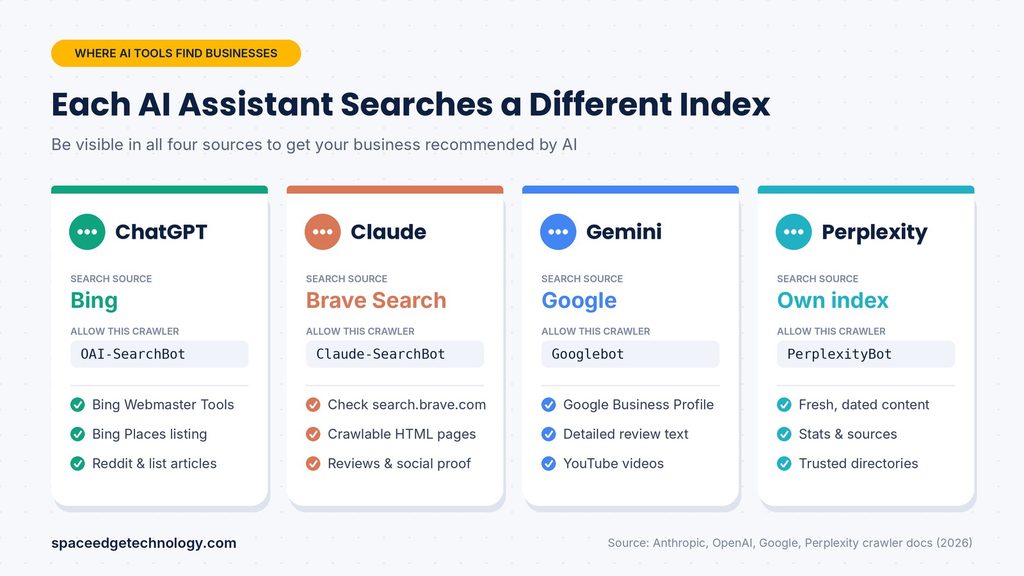
| AI Tool | Main search source | Its crawlers | What it tends to favor |
|---|---|---|---|
| ChatGPT | Bing plus OpenAI's own crawling | OAI-SearchBot, ChatGPT-User, GPTBot | Wikipedia, Reddit, big publications, list-style articles |
| Claude | Brave Search | Claude-SearchBot, Claude-User, ClaudeBot | Pages that rank well on Brave, reviews and social proof |
| Gemini and Google AI Mode | Google's index | Googlebot | Google Business Profile, YouTube, Reddit, review text |
| Perplexity | Its own index plus other sources | PerplexityBot, Perplexity-User | Fresh, data-rich pages with clear answers and authority |
ChatGPT
ChatGPT's web search draws heavily on Microsoft Bing's index, along with OpenAI's own crawler, called OAI-SearchBot. Many business owners ignore Bing. That is a mistake now. If Bing does not know your pages, ChatGPT has a much harder time finding them.
Research from Peec AI in March 2026 found ChatGPT leaned heavily on Wikipedia, Reddit and Forbes when citing sources. A 2026 Semrush study found ChatGPT cites around 15 sources per answer. That is good news. More slots means more chances to be included.
Claude
Claude, made by Anthropic, uses Brave Search for its web search. Anthropic lists Brave Search as a web search provider on its official subprocessor list. Brave runs its own independent index of the web. It is not a copy of Google or Bing.
So if you want Claude to find you, check that your site shows up in Brave Search. Go to search.brave.com and search for your business name and main services.
Gemini and Google AI Mode
Gemini and Google's AI features use Google's own index. That means your normal Google SEO work feeds straight into Gemini. Your Google Business Profile matters a lot here. Gemini also reads the text inside your reviews. If customers write "great for wheelchair users" or "fast same-day service," Gemini can use those details to match you with very specific questions.
Semrush found that Gemini usually cites only around three sources per answer. That makes Gemini more competitive. You need to be one of the very best matches.
Perplexity
Perplexity calls itself an answer engine. It shows citations in every single answer. It runs its own crawler, PerplexityBot. Perplexity likes content that answers questions directly, uses specific numbers and is recently updated. It also gives weight to trusted directories such as chambers of commerce and industry bodies.
GEO vs SEO vs AEO: What Is the Difference?
You will hear three terms a lot. Here is what each one means in plain words.
- SEO (Search Engine Optimization): Making your website rank higher in normal search results like Google and Bing. The goal is the click.
- AEO (Answer Engine Optimization): Writing and structuring content so it directly answers questions. The goal is to be the answer in featured snippets, voice search and AI summaries.
- GEO (Generative Engine Optimization): Making your business easy for AI tools like ChatGPT, Claude, Gemini and Perplexity to find, trust, quote and recommend. The goal is the mention.
These are not rivals. They stack. Good SEO gets you into the search index. Good AEO makes your content easy to quote. Good GEO builds the trust and reputation that makes AI choose you over others.
If you already invest in professional SEO services, you have a head start. GEO builds on the same foundation.
12 Steps to Get Your Business Recommended by AI
Here is the practical part. Work through these steps in order. The early steps fix problems that can block you completely. The later steps help you win against competitors.
1. Let AI Crawlers Read Your Website
This sounds basic. Yet it is the most common reason businesses never show up.
Many websites block AI bots by accident. Some security plugins, hosting firewalls and CDN settings now block AI crawlers by default. Cloudflare, for example, offers a "Block AI Bots" setting. If it is turned on, AI tools may never see your pages, even if your robots.txt file looks fine.
AI companies use different bots for different jobs:
- Search bots find pages to show and cite in answers. Examples: OAI-SearchBot (ChatGPT), Claude-SearchBot (Claude), PerplexityBot (Perplexity).
- User bots fetch a page when a person asks the AI to look at it. Examples: ChatGPT-User, Claude-User, Perplexity-User.
- Training bots collect content to train future AI models. Examples: GPTBot (OpenAI), ClaudeBot (Anthropic), Google-Extended (Google).
If you want to be recommended, allow the search and user bots at minimum. Blocking training bots is a business choice. It will not remove you from live AI search answers, but it may reduce how well future models "remember" your brand.
Here is a simple robots.txt example that allows the main AI search crawlers:
User-agent: OAI-SearchBot
Allow: /

User-agent: ChatGPT-User
Allow: /

User-agent: Claude-SearchBot
Allow: /

User-agent: Claude-User
Allow: /

User-agent: PerplexityBot
Allow: /

User-agent: Perplexity-User
Allow: /

User-agent: *
Allow: /

Sitemap: https://www.yourdomain.com/sitemap.xml
To check your file, type yourdomain.com/robots.txt into any browser. Then check your firewall or CDN settings too. A reliable domain and web hosting setup makes this easier to control.
2. Get Indexed on Google, Bing and Brave
Remember, each AI uses a different index. You need to be in all of them.
- Google: Add your site to Google Search Console. Submit your sitemap. Check the "Pages" report for errors.
- Bing: Add your site to Bing Webmaster Tools. You can import your settings straight from Google Search Console in a few clicks. Bing also supports IndexNow, which tells Bing about new or updated pages instantly.
- Brave: Brave does not offer a webmaster tool like Google or Bing. It finds pages by crawling the open web. If Google can crawl your site well and other sites link to you, Brave usually finds you too. Search your brand on search.brave.com to check.
Also make sure your important content is in plain HTML text. If key details only load through heavy JavaScript, some crawlers may miss them. A fast, clean, mobile-friendly site helps every crawler. If your current site is slow or hard to crawl, a modern website redesign may be the best first investment.
3. Make Your Business Identity Crystal Clear
AI tools think in "entities." An entity is a clearly defined thing, like a person, a place or a business. The AI wants to know exactly who you are, what you do, where you do it and who you serve.
Help it by putting a clear, simple summary on your home page and About page. For example:
"Green Leaf Plumbing is a licensed plumbing company serving homes and small businesses since 2012. We specialise in emergency leak repair, water heater installation and bathroom plumbing."
Notice what that sentence does. It names the business. It says what it is. It lists the main services. It gives a start date. An AI can lift that sentence and use it directly.
Avoid vague taglines like "Solutions that inspire." They tell the AI nothing.
Also create a strong About Us page with real names, real photos, years of experience, licenses and awards. This supports Google's E-E-A-T idea: Experience, Expertise, Authoritativeness and Trustworthiness.
4. Keep Your Business Details the Same Everywhere
AI tools cross-check facts across many websites. If your phone number is different on three sites, the AI gets confused. Confused AI does not recommend.
Your core details are often called NAP:
- Name
- Address
- Phone number
Add your website, opening hours, categories and a short description to that list. Keep them identical on:
- Your own website
- Google Business Profile
- Bing Places for Business
- Apple Business Connect
- Facebook, Instagram and LinkedIn pages
- Industry directories and local business listings
- Chambers of commerce and trade associations
Even small differences, like "Street" on one site and "St." on another, are worth fixing where you can. Consistency builds confidence.
5. Build a Complete Google Business Profile and Bing Places Listing
For local businesses, these two listings are gold.
Gemini and Google AI Mode lean on Google Business Profile data. ChatGPT draws on Bing, so Bing Places matters for it. Fill in every single field:
- Primary and secondary categories
- Services and products, with short descriptions
- Opening hours, including holiday hours
- Attributes like "wheelchair accessible" or "free Wi-Fi"
- At least 10 to 20 real photos of your work, team and location
- Your service area
- Regular posts with offers, updates and news
- Questions and answers about your business
Every completed field gives the AI one more fact it can match to a customer's question.
6. Earn More Reviews and Better Review Text
Reviews are one of the strongest trust signals for AI. But the number of stars is only part of the story. The words inside the review matter just as much.
Picture this. Someone asks, "Which family restaurant near me has good vegetarian options and space for kids?" The AI looks for reviews that mention vegetarian food and kids. If your reviews only say "Great place!" you miss out.
Here is how to get better reviews:
- Ask every happy customer. Do it right after a good experience.
- Make it easy. Send a direct review link by email, SMS or WhatsApp. Tools like WhatsApp Business API and bulk email can automate polite review requests.
- Guide gently. Ask customers to mention what service they used and what they liked. Never script or fake reviews. Fake reviews break platform rules and can get you penalised.
- Spread out. Collect reviews on Google, plus industry sites like Trustpilot, G2, TripAdvisor or Yelp, depending on your field.
- Reply to every review. Thank happy customers. Calmly solve problems for unhappy ones. AI reads your replies too.
7. Write Content That Answers Real Customer Questions
People talk to AI the way they talk to a friend. Their questions are long and specific. Google has said early AI Mode users asked questions two to three times longer than normal searches.
So your content should match those real questions.
Start by building a question list. Here is where to find questions:
- Write down every question customers ask on calls, emails and chats.
- Look at the "People also ask" box in Google for your main services.
- Check Reddit and Quora threads about your industry.
- Ask ChatGPT or Perplexity, "What questions do people ask before hiring a [your service]?"
Then create pages that answer them. Good page types for AI include:
- Service pages that explain exactly what you offer, who it is for, what it costs and how it works.
- Comparison pages, like "Option A vs Option B: which is better for small businesses?"
- "Best of" list articles for your category. Research from Peec AI in early 2026 found list-style articles were the single strongest format for getting cited in ChatGPT.
- How-to guides that solve real problems step by step.
- Pricing pages with honest price ranges. AI tools are often asked "How much does X cost?" Pages that give a clear answer have a better chance of being quoted.
- FAQ sections with short, direct answers.
8. Structure Your Pages So AI Can Lift Answers Easily
AI tools pull small chunks of text from pages. Make those chunks easy to find and easy to use.
Follow these simple rules:
- Answer first. Put the direct answer in the first one or two sentences under each heading. Then explain.
- One idea per section. Use clear H2 and H3 headings that match real questions.
- Write short paragraphs. Two to four sentences each.
- Use lists and tables. Steps, features, prices and comparisons work great as lists and tables.
- Use plain words. If a 10-year-old can understand it, an AI can quote it cleanly.
- Make each section stand alone. A reader, or an AI, should understand a section even if they skip the rest of the page.
Look at how this article is built. The quick answer is at the top. Every heading matches a question. Each section starts with the main point. That is the pattern AI tools love.
9. Add Facts, Numbers and Original Data
Vague claims get ignored. Specific facts get quoted.
Compare these two sentences:
- "We are a trusted company with lots of happy customers."
- "Since 2008, we have completed more than 3,000 projects for over 500 clients, with an average rating of 4.8 out of 5."
The second one gives an AI something solid to work with.
A well-known research paper on Generative Engine Optimization, from researchers at Princeton and other universities, tested this idea. They found that adding statistics, quotations from experts and citations to trusted sources made content noticeably more visible in AI-generated answers. Some methods lifted visibility by around 30 to 40% in their tests.
Ways to add strong facts:
- Share your own numbers: years in business, customers served, projects done, average delivery time.
- Run a simple survey of your customers and publish the results.
- Share case studies with real before-and-after results.
- Quote recognised experts, including your own team members, with their names and job titles.
- Link to trusted sources when you mention outside facts.
Original data is especially powerful. If you publish a fact no one else has, every site that mentions it points back to you. That builds both links and AI trust.
10. Get Mentioned on Other Trusted Websites
This is the step most businesses skip. It is also the one that often makes the biggest difference.
AI tools trust what others say about you more than what you say about yourself. When many independent sources mention your business in a positive way, the AI becomes more confident recommending you.
Here is where to focus:
- "Best of" lists in your industry. Find articles like "Best accounting software for freelancers" or "Top 10 wedding photographers in [city]." Reach out to the authors with useful details about your business. Ask to be considered.
- Industry publications and local news. Share expert tips, survey results or community stories with journalists. This is often called digital PR.
- Reddit and forums. AI tools cite Reddit often. Join conversations in your niche. Be genuinely helpful. Do not spam or self-promote in every post. Real, useful answers build a good reputation over time.
- YouTube. Google's AI features cite YouTube often. Short videos that answer common customer questions can help. Add clear titles, descriptions and transcripts.
- Podcasts and webinars. Being a guest expert creates mentions, links and transcripts that AI can read.
- Wikipedia and Wikidata. Only if your business is truly notable and meets their rules. Never write promotional entries. They will be removed.
- Partner and supplier websites. Ask partners to list you as a client, partner or supplier with a link.
- Social media. Active, consistent profiles help AI confirm you are a real, active business. Good social media optimization keeps your profiles complete and on brand.
Think of it this way. Every trusted mention is like a friend vouching for you. The more friends who vouch, the more the AI believes it.
11. Add Schema Markup to Your Website
Schema markup is a small piece of code that labels the information on your page. It tells machines, "This is the business name. This is the address. These are the opening hours. This is a review."
Useful schema types for most businesses include:
- Organization or LocalBusiness for your company details
- Product or Service for what you sell
- FAQPage for question-and-answer sections
- Article for blog posts, with author and date
- Review and AggregateRating where allowed
Let us be honest about schema, though. Some 2026 studies found that adding schema on its own did not create a big jump in AI citations. Schema is not a magic switch. It works best as support. It helps search engines understand your pages correctly, which then helps the AI tools that rely on those search engines. Add it, but do not expect it to replace the other steps.
Many website platforms, like WordPress with SEO plugins, can add basic schema for you.
12. Keep Your Content Fresh and Accurate
AI tools, especially Perplexity, tend to prefer recent content. Old pages with outdated prices, dead links or last year's facts lose trust.
Build a simple routine:
- Review your top 10 to 20 pages every three months.
- Update facts, prices, screenshots and examples.
- Change the "last updated" date only when you truly update the page.
- Add new questions to your FAQ sections as customers ask them.
- Publish new helpful content on a steady schedule. A regularly updated blog signals an active, current business.
Freshness also helps in a second way. AI tools sometimes repeat wrong information about a business. If your own pages are clear and current, you give the AI a better source to correct itself.
Platform-Specific Tips at a Glance
The 12 steps above help across all AI tools. Here are a few extra tips for each one.
Tips for ChatGPT
- Verify your site in Bing Webmaster Tools and submit your sitemap.
- Claim and complete your Bing Places for Business listing.
- Allow OAI-SearchBot and ChatGPT-User in robots.txt.
- Aim to be featured in well-known list articles and discussed on Reddit.
Tips for Claude
- Search your brand and services on search.brave.com to check your visibility.
- Allow Claude-SearchBot and Claude-User in robots.txt.
- Focus on strong reviews and clear social proof across trusted sites.
- Keep pages crawlable in plain HTML, since Brave crawls the open web.
Tips for Gemini and Google AI Mode
- Treat your Google Business Profile as a top priority.
- Encourage detailed reviews that mention specific services and features.
- Publish helpful YouTube videos that answer customer questions.
- Keep up strong traditional Google SEO, since Gemini uses Google's index.
Tips for Perplexity
- Allow PerplexityBot and Perplexity-User in robots.txt.
- Publish data-rich content with clear numbers and sources.
- Update key pages often and show the update date.
- Get listed in respected directories, trade associations and local business bodies.
How to Check If AI Tools Are Recommending Your Business
You cannot improve what you do not measure. Luckily, you can start checking for free today.
Run a Simple Prompt Test
Make a list of 10 to 20 questions your customers might ask an AI. Mix different types:
- "What is the best [service] in [city]?"
- "Which [product type] is best for [specific need]?"
- "[Your brand] vs [competitor]: which is better?"
- "Is [your brand] good?"
- "How much does [service] cost in [city]?"
Ask each question in ChatGPT, Claude, Gemini and Perplexity. Use a private or logged-out window where possible, so your past chats do not affect the results.
Write down the answers in a simple spreadsheet:
- Were you mentioned? Yes or no.
- Where in the answer did you appear?
- Was the information about you correct?
- Which competitors were named?
- Which sources did the AI cite?
That last column is very useful. It shows you exactly which websites the AI trusts in your industry. Those are the sites where you want to be mentioned.
Repeat the test once a month. AI answers change often, so look at trends over time, not one single result.
Track AI Referral Traffic in Google Analytics 4
When someone clicks a link inside an AI answer, they often arrive with a referral source like chatgpt.com or perplexity.ai. You can track this in Google Analytics 4.
Go to Reports, then Acquisition, then Traffic acquisition. Change the main dimension to "Session source." Then add a filter using a regular expression like this one:
chatgpt|openai|perplexity|claude|anthropic|gemini|bard|copilotThis shows you how many visitors come from AI tools and which pages they land on. Some AI traffic still shows up as "direct" because not every click passes a referrer. So treat these numbers as a minimum, not the full picture.
Also watch for branded search growth in Google Search Console. When AI tools mention you, some people later search your name directly on Google.
Use AI Visibility Tools
Several paid tools now track how often brands appear in AI answers. They run hundreds of prompts automatically and report your "share of voice" against competitors. These can save time once you grow, but the free manual test above is a fine place to start.
Common Mistakes That Keep Businesses Out of AI Answers
Avoid these traps. Each one can quietly stop AI tools from recommending you.
- Blocking AI crawlers by accident. Check robots.txt, security plugins and CDN settings.
- Ignoring Bing and Brave. Google is not the only index that matters anymore.
- Using vague marketing language. "World-class solutions" tells AI nothing. Say exactly what you do.
- Inconsistent business details. Different phones, addresses or names across sites confuse AI.
- Thin service pages. One short paragraph per service is not enough for AI to understand you.
- Hiding prices completely. You do not need exact quotes, but honest ranges help AI answer cost questions.
- Buying fake reviews or spamming forums. It breaks platform rules and can destroy trust with both people and machines.
- Only talking about yourself. Without third-party mentions, AI has little reason to trust you.
- Letting content go stale. Old facts and broken pages push AI toward newer sources.
- Chasing tricks. Hidden text or "prompt injection" tricks meant to fool AI tools can backfire and damage your reputation.
A Simple 30-Day AI Visibility Action Plan
Do not try to do everything at once. Here is a realistic plan for the first month.
| Week | Focus | Tasks |
|---|---|---|
| Week 1 | Fix access and indexing | Check robots.txt and firewall. Set up Google Search Console and Bing Webmaster Tools. Submit sitemaps. Search your brand on Brave. |
| Week 2 | Clean up your identity | Write a clear business summary. Update your About page. Make NAP details match on all listings. Complete Google Business Profile and Bing Places. |
| Week 3 | Improve key pages | Rewrite your top 5 service pages with answer-first sections, facts, prices and FAQs. Add basic schema. |
| Week 4 | Build trust and measure | Start a review request routine. Reach out to 5 to 10 relevant list articles or publications. Run your first AI prompt test and record results. |
After the first month, keep going. Publish one or two helpful articles every month. Keep collecting reviews. Keep earning mentions. Re-test your AI visibility every month. GEO, like SEO, rewards steady effort over time.
Can You Pay to Be Recommended by AI?
You cannot pay ChatGPT, Claude, Gemini or Perplexity to be recommended in their normal answers. Their organic answers are based on what they find and trust.
Some AI platforms are testing or offering advertising. These ads are usually labelled and kept separate from the main answer. If you run ads, treat them like any paid channel, such as Google Ads and PPC campaigns. They can bring quick traffic, but they do not replace the trust you build organically.
Be careful with anyone who promises "guaranteed" AI recommendations. No honest agency can guarantee what an AI will say. What a good partner can do is improve the signals AI tools use to make their choices.
Final Thoughts
Getting your business recommended by ChatGPT, Claude, Gemini and Perplexity is not about secret tricks. It comes down to three simple ideas:
- Be findable. Let AI crawlers in and get indexed on Google, Bing and Brave.
- Be clear. Explain exactly who you are, what you do and who you help, with real facts.
- Be trusted. Earn reviews, mentions and links from real people and respected websites.
Businesses that start now have an advantage. The space is still uncrowded, and AI tools are forming their views about who leads each industry. The earlier you build strong signals, the harder it is for competitors to catch up.
If you want expert help, the team at SpaceEdge Technology has helped businesses grow online since 2008 with SEO, content, web design and digital marketing. Contact us for a free audit of your website and AI visibility.
Frequently Asked Questions
How do I get my business mentioned by ChatGPT?
Get your website indexed on Bing, since ChatGPT draws heavily on Bing's index. Allow OAI-SearchBot in your robots.txt file. Complete your Bing Places listing, collect detailed reviews, publish clear pages that answer customer questions, and earn mentions in trusted list articles, news sites and Reddit discussions.
What is Generative Engine Optimization (GEO)?
Generative Engine Optimization is the practice of making your business easy for AI tools like ChatGPT, Claude, Gemini and Perplexity to find, understand, trust and recommend. SEO aims to get you clicked in search results. GEO aims to get you mentioned and quoted inside AI answers.
Does SEO still matter for AI search?
Yes. AI assistants use search engine indexes to find pages. ChatGPT relies heavily on Bing, Gemini on Google and Claude on Brave Search. If your site does not rank or is not indexed, AI tools are far less likely to find and recommend you. Strong SEO is the foundation of AI visibility.
How long does it take to get recommended by AI tools?
Quick fixes like unblocking crawlers can help within days or weeks. Building strong trust signals, such as reviews, mentions and authority, usually takes three to six months or more. Results depend on your industry, competition and how much consistent effort you put in.
Why does ChatGPT recommend my competitors but not me?
Usually your competitors have stronger signals. They may be better indexed on Bing, have more detailed reviews, appear in more "best of" lists or have clearer website content. Run a prompt test, note which sources the AI cites, and work on getting your business mentioned on those same sites.
Does Claude use Google search?
No. Claude's web search uses Brave Search, which runs its own independent web index. Anthropic lists Brave Search as a web search provider. To appear in Claude's answers, make sure your site is crawlable and visible in Brave Search, and allow Claude-SearchBot in your robots.txt file.
Should I block AI crawlers on my website?
If you want AI tools to recommend you, do not block their search crawlers. Allow OAI-SearchBot, Claude-SearchBot, PerplexityBot and their user bots. You can choose to block training-only bots like GPTBot or ClaudeBot. That will not remove you from live AI search answers.
Does schema markup help with AI recommendations?
Schema markup helps search engines understand your business details, services and FAQs. That indirectly helps AI tools that rely on those search engines. But recent studies show schema alone does not create a big jump in AI citations. Use it as support alongside clear content, reviews and mentions.
How can I check if Perplexity or Gemini recommends my business?
Ask both tools the questions your customers would ask, such as "best [service] in [city]." Use a private window, record whether you appear and note the sources cited. Repeat monthly. You can also track visits from perplexity.ai and gemini.google.com in Google Analytics 4.
Can small local businesses get recommended by AI?
Yes. AI tools often answer local questions like "best plumber near me." Small businesses can compete by completing their Google Business Profile and Bing Places listings, keeping details consistent, earning detailed local reviews and getting listed in trusted local directories and community websites.
Want results like this for your business?
Book a free marketing audit and see exactly where your growth opportunities are.
Get Free Audit →